Product · quoting
Price the job from the nest you will cut
A price is built from lines: the steel, the cutting, the work you add, and your markups. Nest&Quote takes each quantity from the nest itself (square metres and kilograms of steel, metres of cut, pierces, the travel between them) and multiplies it by a rate you can see and change.
Where things stand: with an account, the quote builder is live. It makes one line per part from the nest, priced with your machines, materials, markups and operations, and prints the quote as a PDF in German or English. Without an account, the nester shows the steel consumed, the cut length, the pierce count and a first price on default rates. The full list is further down this page.
Nest a job See a sample job priced on default rates
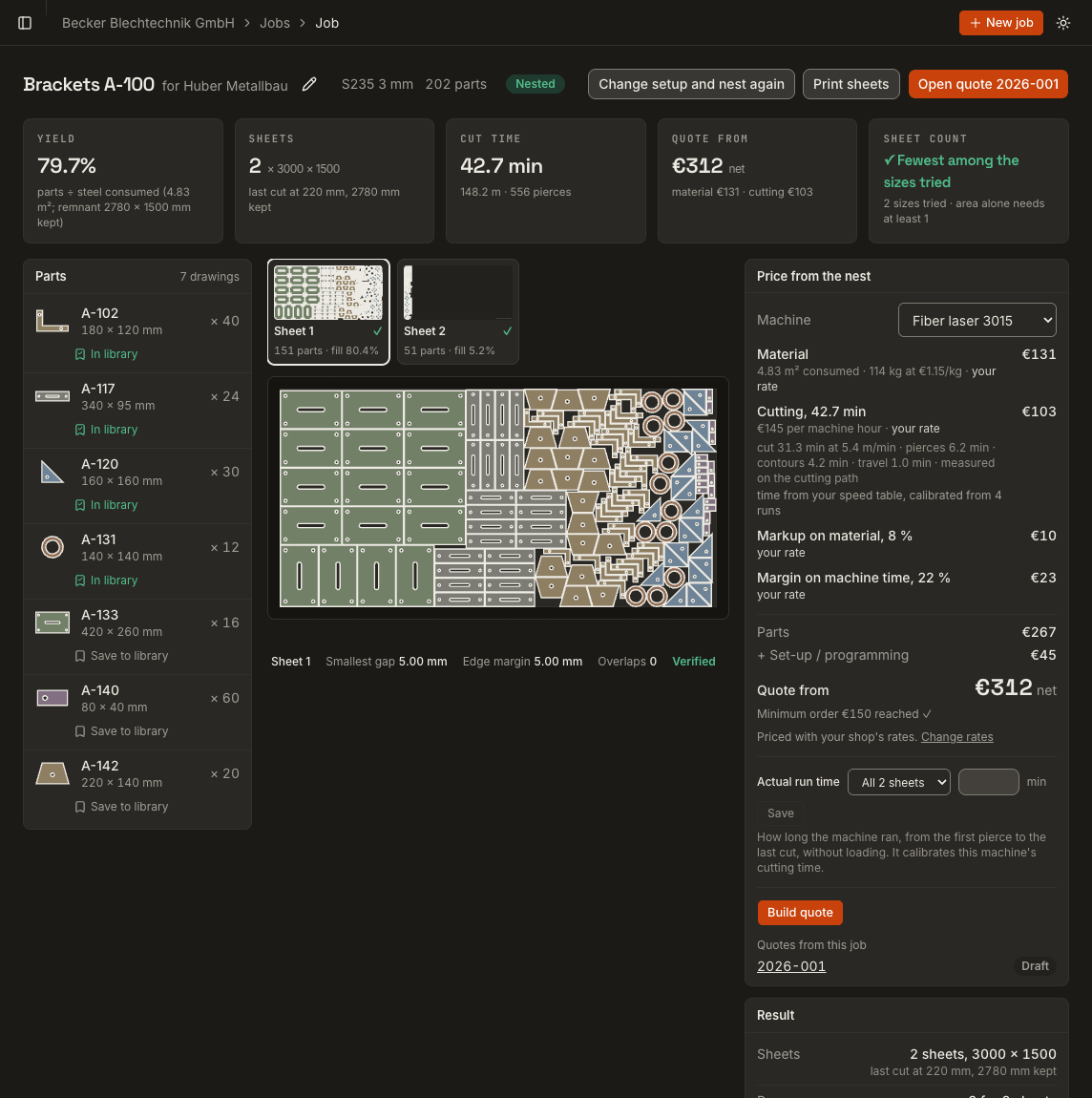
A quote is lines, and every line is quantity × rate
Many shops price from the part: its area, a scrap factor, and experience of how long it takes on the machine. In Nest&Quote the quote starts from the nest, because the nest is what goes on the machine.
| Line | Quantity | Where the quantity comes from |
|---|---|---|
| Material | m² and kg of steel | the nest: steel consumed × thickness × density |
| Cutting | minutes | the nest: cut length, pierces, travel |
| Operations | bends, coating, deburring, hours | you, per part on the quote; bends are counted from the drawing |
| Setup | per quote | a fixed charge from your settings |
| Markups | % on material, % on machine time | your defaults, which you can change on each quote |
The price panel shows each line's quantity, its rate, where that rate came from, and the amount. On a quote you can change the markups, the operations and any piece price; a rate changed on the Rates page applies to new quotes from then on. Remembering the operations per part code, so a repeat order starts filled in, is planned.
Nest&Quote proposes each line. You decide the price.
Material: the steel the nest consumes
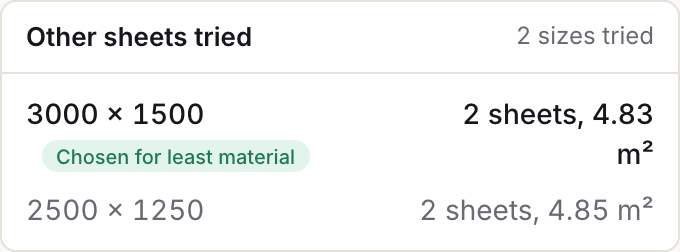
- The job is nested on every sheet size you stock, and the size that uses the least steel is kept.
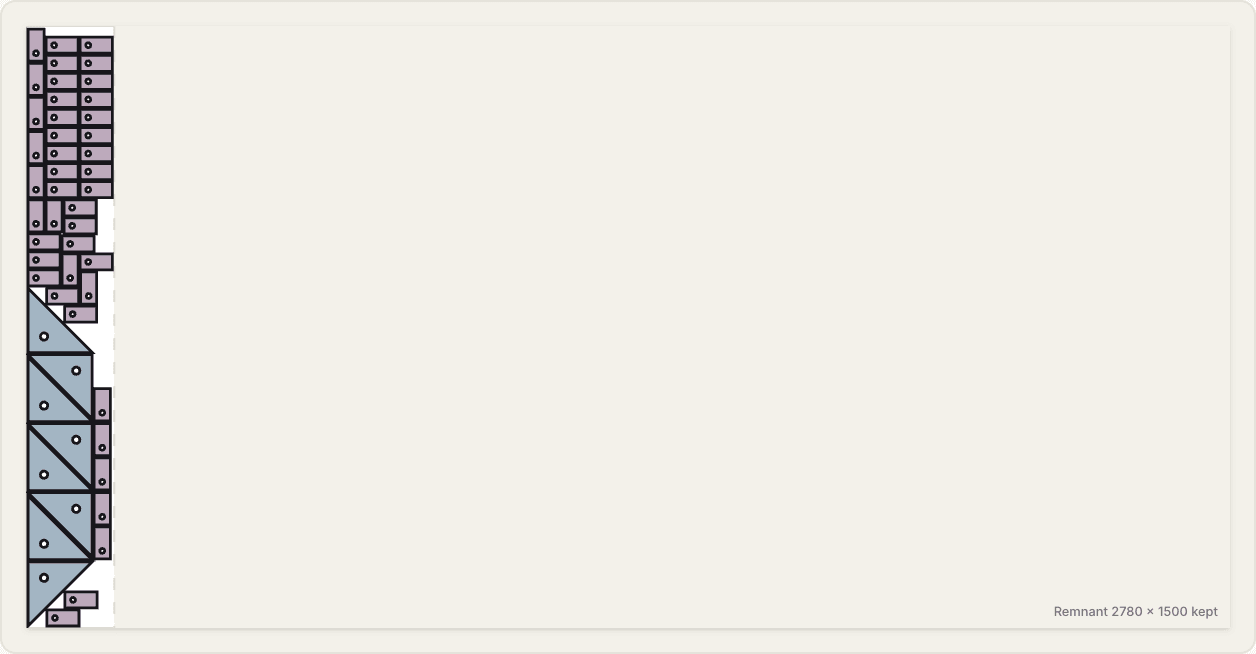
- Steel consumed counts the full sheets plus the used length of the last sheet. The rest of the last sheet is shown on the nest as a remnant, with its size.
- Square metres become kilograms through thickness and density: 11.64 m² of 3 mm steel at 7.85 kg/dm³ is 274 kg.
- The material line prices that by the kilogram, at your rate or the default.
Cutting: length, pierces and travel
Cut time is not the cut length divided by one speed. On the nest it is:
- the length of each contour at the speed for that thickness, slower for small holes and short contours
- plus pierces × pierce time
- plus rapid travel between the pierce points of this nest
- plus a small allowance per contour for the head lifting and settling
The ‘Price from the nest’ panel works out cut time this way today: the cut length at a feed for the material and thickness, pierces × pierce time, a time per contour, and the travel, measured between the pierce points of the nest's cutting path. Until you type your machine's speeds, the feeds and pierce times are defaults. The slower speed for small holes and short contours is still to come. Speed by thickness is the one table a shop has to own in the end; the defaults, typical values for laser, plasma, waterjet and CNC router by material and thickness, are a starting point.
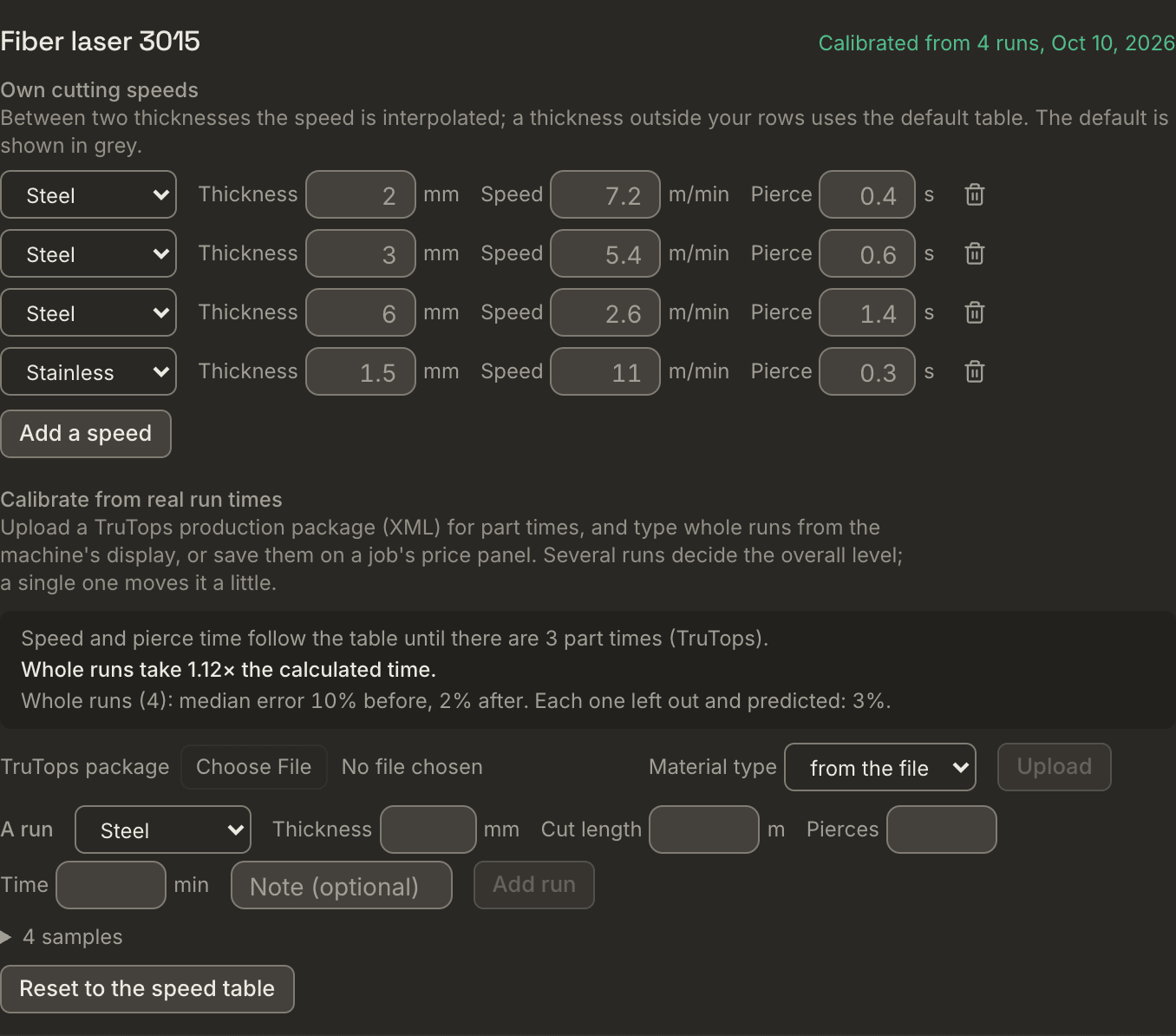
With an account, each machine can have its own speed table: cutting speed per material type and thickness, and the pierce time if you want to set it. A thickness between two of your rows is interpolated; one outside them uses the default table. The same speeds feed the price, the cutting-path simulation and the feed of the machine program.
Calibrated from real run times
A speed table says how fast the head moves, not how long a sheet takes: acceleration, small contours and the machine's own pauses add to it. So each machine can also be calibrated from how long its jobs really took:
- TruTops production packages (XML). Upload one on the Rates page. Its part list gives the time per piece that TruTops calculated for your machine; each program gives the time for a sheet. The part times fit a factor on the speed, on the pierce time and on the time per contour.
- Run times you type. On a job's price panel, type how long the nest (or one sheet of it) ran on the machine. On the Rates page you can also type a run from the machine's display: material type, thickness, cut length, pierces and time. Whole runs fit one overall factor. Several runs decide it; a single one moves it only a little.
The Rates page shows the result in plain words (for example cuts 1.5× faster than the table) and the median error before and after, tested on each sample left out once there are three or more. The price panel says where each time comes from: default speed table, your speed table, and calibrated from N runs once the machine has been calibrated. A quote keeps the time it was built with, and says whether it was calibrated. Reset to the speed table removes the run times and the fit; your own speeds stay.
Why cut time matters more than nest density
Machine reports from real laser jobs show the same pattern: the machine time is worth far more than the steel a tighter nest can save, and the sheets of one job do not cut at one speed.
Three things follow from it.
- Machine time outweighs nest differences. An hour and a half of machine time at €100–150 an hour is €150–225. A tighter nest of the same job saves a few euros of steel. A 3 % error in cut time costs as much as that whole saving. Better material utilisation still pays, but the cutting line decides whether the quote is right.
- Most cut time is fixed by the parts. Contour length and pierce count are the same whatever the nest. The nest changes the travel, the cut order and how many programs the operator runs.
- Small parts cut slowly. The sheet with the small parts left over runs at about twice the minutes per metre of the others: short contours, many pierces, the head accelerating and braking. A single metres-per-minute figure is off by up to 2× on small-part work.
Rates: yours, or defaults until you set yours
No missing rate holds up a first quote. The Rates page holds:
- machines: name, process and hourly rate, your own cutting speeds and pierce times, and the calibration from real run times
- materials: the built-in ones at your price per kg, and your own grades with their type, density and price
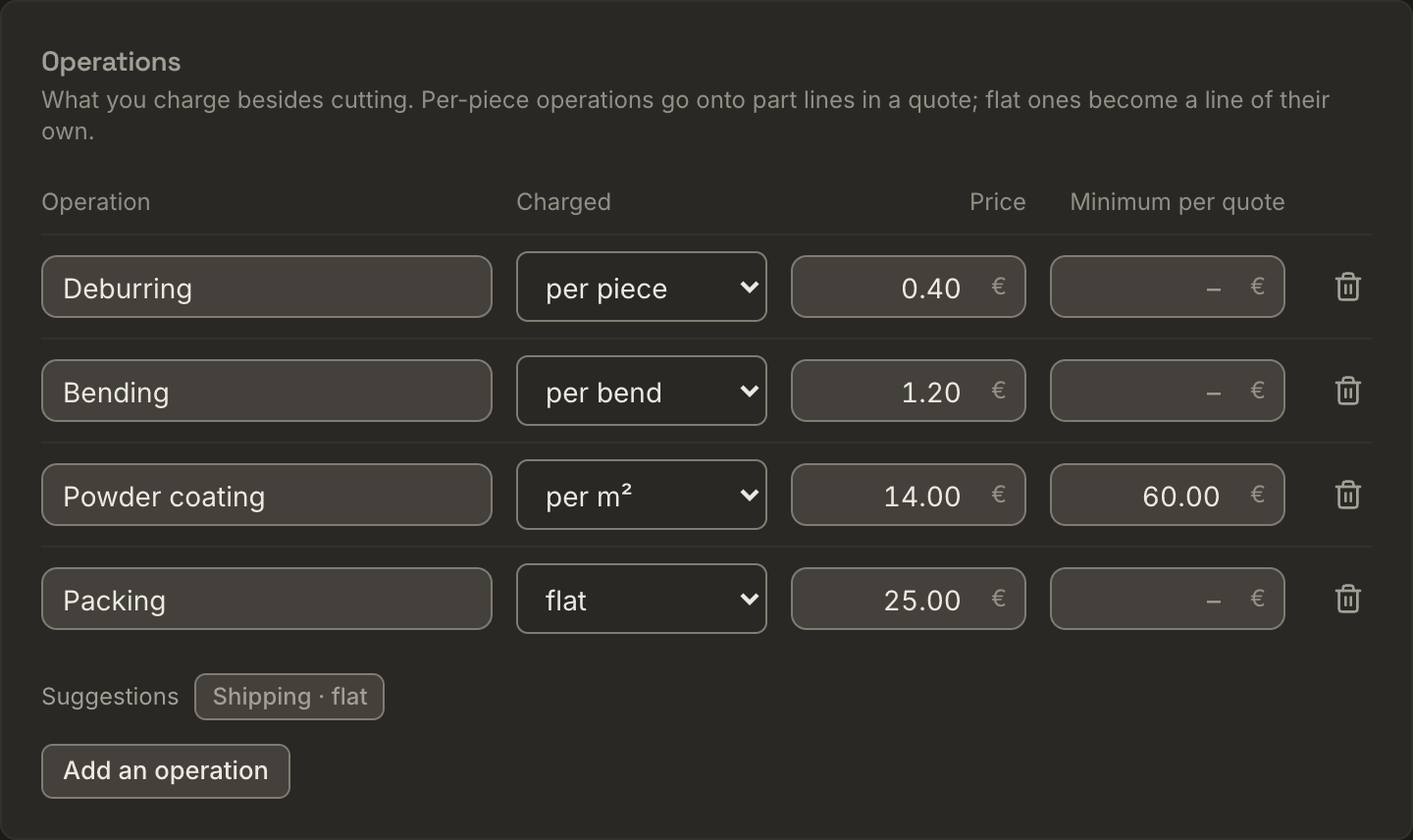
- operations: per piece, per bend, per m² with a minimum, per kg or per hour, and flat lines such as packing
- fixed charges: set-up or programming per quote, minimum order value, express surcharge
- markups: one on material, one on machine time
Every rate you have not set is preloaded and labelled default. The price panel says for each line whether its rate is yours or a default.
Later: rates from the quotes you have already sent
Not every shop knows its hourly rate as a number. It is in the prices the shop has sent. Nest&Quote will work it out from about 20 of your sent quotes: the rate each operation implies and your margin, each with a range, and a list of the quotes it cannot reproduce, which you can mark as a rush job, a favour or an outlier.
It will need quotes whose lines carry quantities (hours, kg, bends), or the drawings of those jobs, which Nest&Quote will nest to measure the quantities itself. A total price on its own cannot be split into rates.
Your machine's files already do the same for cut time: see Calibrated from real run times above.
Derived rates will replace typed ones line by line, labelled derived from N jobs. Where the history is thin, fewer than five jobs, the typed or default rate stays and the line says why. This part ships only once it reproduces quotes from a real shop that it was not fitted on. Past quotes stay optional: a quote never needs them.
Worked example: a job in 3 mm steel
The rates below are for illustration. They are not our defaults and not any shop's real prices.
| Line | Quantity | From | Rate | Amount |
|---|---|---|---|---|
| Material | 11.64 m² · 274 kg | the nest | €1.30/kg | €356 |
| Cutting | 1 h 29 min | the nest: cut length, pierces, travel | €148/h | €220 |
| Markup on material | 10 % | your default | €36 | |
| Margin on machine time | 25 % | your default | €55 | |
| Bending | 14 bends | counted from the drawings, checked by you | €0.90 per bend | €13 |
| Powder coating | 1.8 m² | both faces of the parts you chose | €31/m², minimum €95 | €95 |
| Set-up | per quote | your set-up charge | flat | €25 |
| Quote, net | €800 |
- The coating works out at 1.8 m² × €31 = €55.80, below the minimum, so the quote charges €95.
- Operations and the set-up charge are your prices as they stand; the markups apply to material and machine time.
- The two lines from the nest, material and cutting, are 72 % of the quote.
- If the cut time is 10 % out, the quote moves by €28, margin included.
- The customer sees one line per part with its piece price, operations included. The build-up above stays with you.
Price breaks: the piece price at other quantities
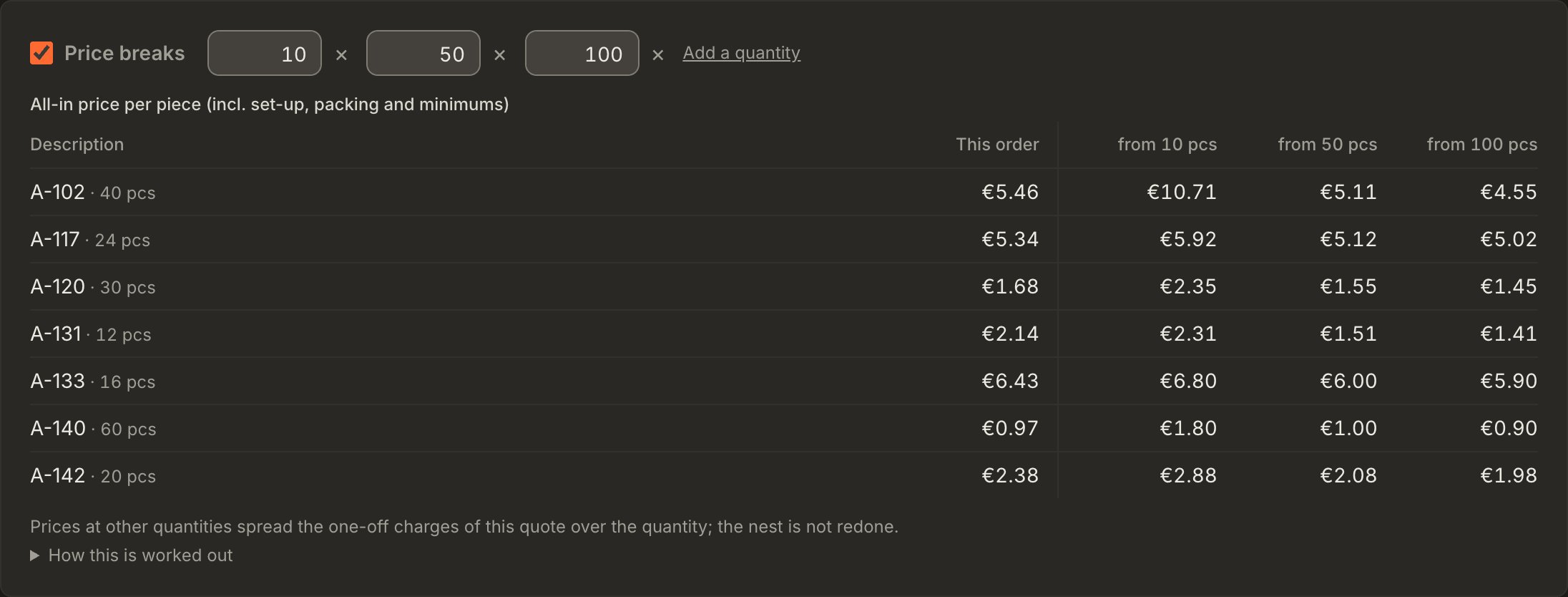
A customer often asks what a part costs at 10, 50 or 100 pieces. With price breaks on, each part line of the quote shows its all-in piece price at those quantities, on screen and on the PDF, after the same price for this order.
- The quantities are a list on the Rates page (up to six); new quotes start with it. Each quote can switch price breaks on or off and change its own quantities. Quotes made before stay without them until you switch them on.
- What is paid per piece stays per piece: the material and cutting share of the part with your markups, and its operations per piece.
- What is paid per order is spread over the pieces: the lines that are not parts (set-up, packing, anything else per order) in equal shares per part line, and an operation's top-up to its minimum, worked out again at each quantity. The express surcharge applies as on the quote. The minimum order value is not spread; the PDF names it.
- Each part is taken as ordered in that quantity, all parts in one order.
- All-in, with this order first. Because the per-order lines are in them, the break prices are labelled All-in price per piece (incl. set-up, packing and minimums). The part line itself shows the piece price without them (set-up and packing are lines of their own), so the row starts with this order: the quantity on the quote, priced the same way. The customer compares like with like, and the row falls as the quantity grows.
- A price you typed on a part line is its piece price at every quantity; the per-order lines still spread.
- Prices at other quantities are worked out from this nest. The job is not nested again for each quantity, so the material per piece is the one this nest used; a larger order may nest tighter.
An example with illustrative prices: part A at €5.20 a piece (€4.80 from the nest with the markups, €0.40 deburring), 25 pieces ordered; part B at €12.00, 40 pieces; and a set-up charge of €80.00. Each part line carries €40.00 of the set-up.
| Part | this order | from 10 pcs | from 50 pcs | from 100 pcs |
|---|---|---|---|---|
| A (25 pcs) | €6.80 | €9.20 | €6.00 | €5.60 |
| B (40 pcs) | €13.00 | €16.00 | €12.80 | €12.40 |
A in this order is €5.20 + €40.00 / 25 = €6.80; its line reads 25 pcs × €5.20, with the set-up as a line of its own. A at 10 pieces is €5.20 + €40.00 / 10 = €9.20. With a deburring minimum of €30, A at 10 pieces also carries the €26.00 the deburring falls short of it: €5.20 + €66.00 / 10 = €11.80.
Writing the quote
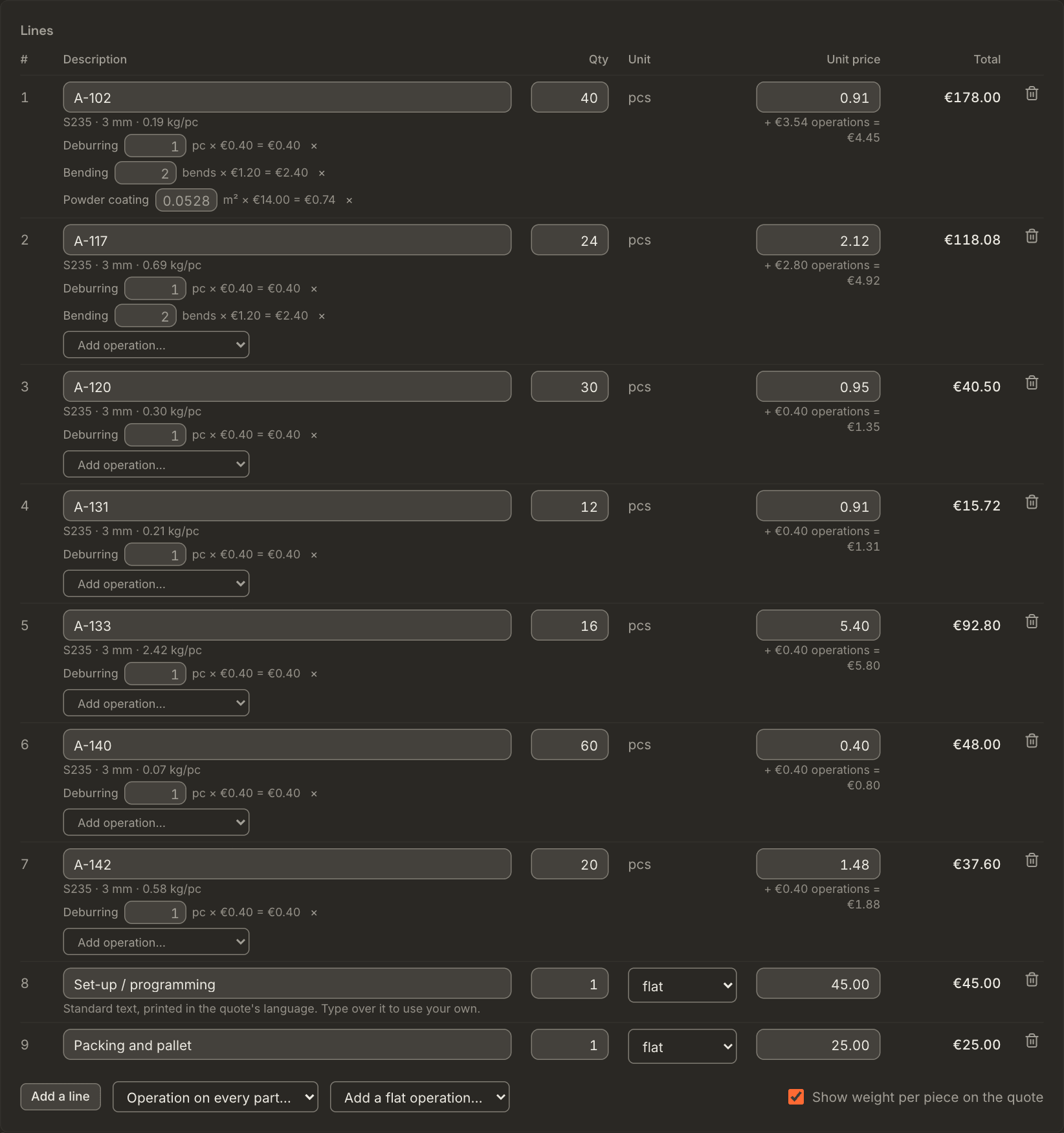
- From the nest to the quote. The price panel's headline is the amount the quote will say: the parts, plus your set-up charge, topped up to the minimum order: Parts €245 · + Set-up / programming €45 · Quote from €290 net, and under it Minimum order €250 reached ✓. Below the minimum order the line says how the quote is topped up to it, part by part. Build quote sits in the job's header next to Print sheets; once a draft exists for the job, the header opens it instead.
- One machine, said out loud. The cutting paths and programs follow the machine the job was nested for, and say so (Planned for TruLaser 3060, kerf 0.2 mm). If the price panel prices another machine, it says that too. If the chosen machine cannot cut a material of the job, the panel says which and asks for another machine.
- The quote's language. Each quote is printed in its own language, German or English, picked next to the PDF button; new quotes take the quote language from Settings (German for shops in Germany, Austria and Switzerland until you choose). Lines the app writes, such as set-up, follow that language; lines you type stay as typed.
- Customers you have quoted before. Type the company and it is offered from your earlier quotes; its address, contact, email and VAT ID are filled in from the latest one.
- One way to send it. Email to customer… sends it from the app (below). For a quote that went out another way, the arrow next to it opens Mark as sent (sent another way)….
- Sending locks it, so it asks first. Marking it sent asks in a dialog that names the quote and the customer before it locks the quote, and a quote without a customer cannot be sent. Leaving a quote with unsaved changes asks first as well. What just happened (saved, sent, an error) shows as a message at the bottom of the screen; errors stay until you close them.
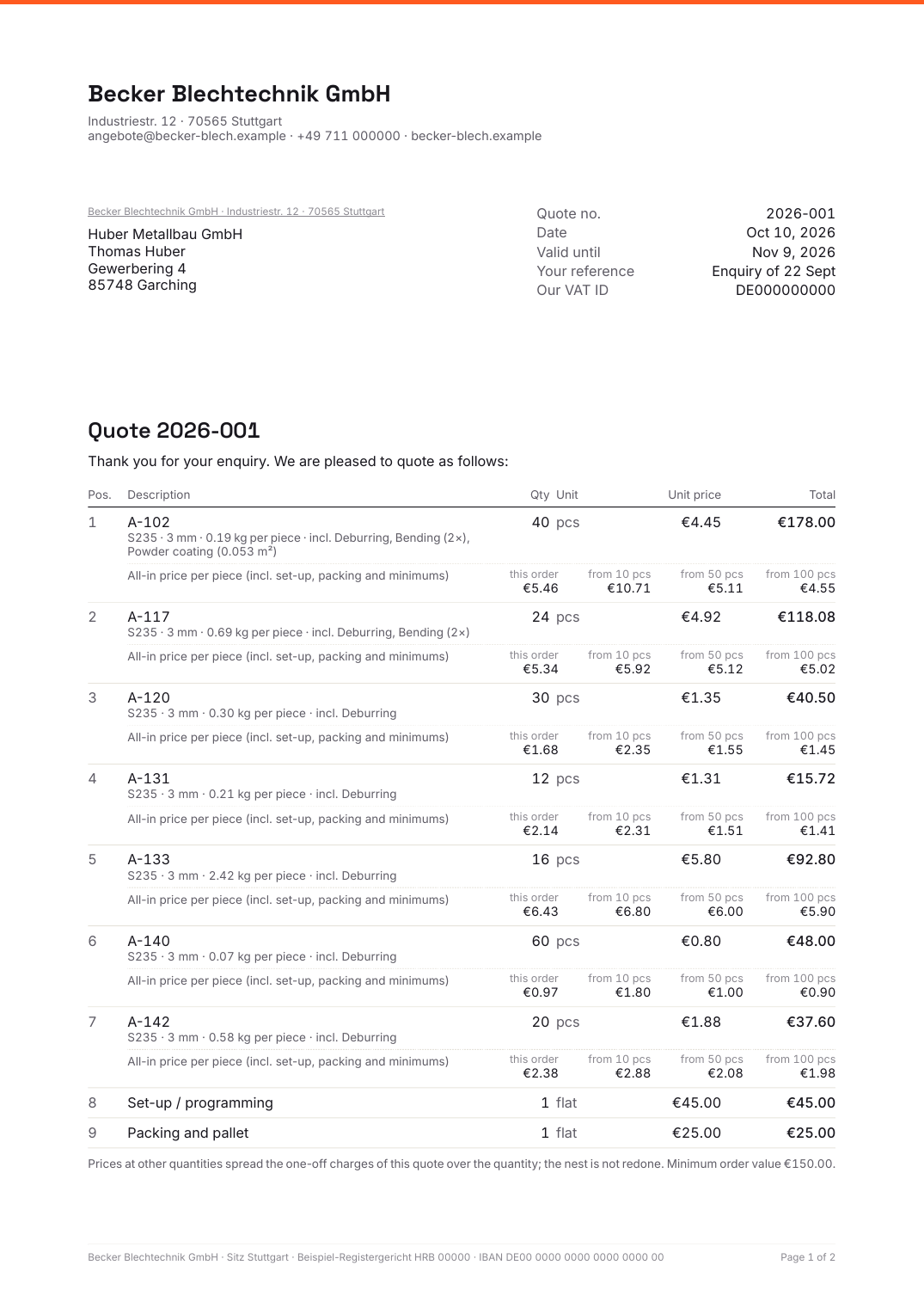
The PDF carries your letterhead and footer, one line per part with its piece price and the operations it includes, the price breaks under each part when they are on, and the totals with the VAT note for the quote's mode. Your internal cost (material, minutes, markups) is never printed.
Sending the quote by email
Email to customer… in the quote editor emails the quote to your customer with the PDF attached, and marks it sent.
- What is sent. Your message, prefilled in the quote's language: the quote number, the total, how long it is valid, and your name; edit it as you like. The quote is attached as a PDF ({shop}-{number}.pdf) in the quote's language. At the foot of the email: your letterhead name, address and contact from Settings, and one line of small print, Sent with Nest&Quote. No images, no links, no tracking.
- From which address. The email comes from Nest&Quote's own sending address, with your shop's name in front: Blech GmbH via Nest&Quote. Your customer sees your shop's name; the receiving mail servers see an address that is verified for sending.
- Replies go to your shop. The reply address is the Reply address for quotes in Settings, typically a shared inbox; left empty, it is the address of whoever sends. In the send dialog you can change it for one email; the setting stays as it is. Replies go straight to that address, not through Nest&Quote.
- Up to five addresses, separated by commas. A copy goes to you unless you untick it.
- Test it first. Send a test to me sends the same email, PDF included, to you alone. The quote stays a draft.
- What it changes. Sending marks the quote as sent and locks it, like marking it sent, and needs the same: a customer, and the VAT ID for an EU business customer. If the email cannot be sent, the quote stays a draft and the editor says so. Each email is listed on the quote: to whom, when and by whom.
- Sent it yourself? Mark as sent (sent another way)…, under the arrow next to Email to customer…, stays for quotes you send from your own mail program.
What it is not
- Not an ERP. No purchase orders, invoicing or scheduling. A quote ends at accepted or lost; what happens after that belongs in the systems you already use.
- Not a customer portal. Your customers do not upload drawings to it or get prices from it. It is for the person in your shop who writes the quote.
What you can use today
In the browser, today:
- nest a job on every sheet size you stock, and keep the one that uses the least steel
- check every sheet for overlaps, part gap, edge margin and parts outside the sheet, with the measured values printed
- read the steel consumed in m², the cut length and the pierce count of the job
- see the remnant on the last sheet, with its size
- see a first price in the ‘Price from the nest’ panel, on default rates labelled as defaults
- print the sheets
With an account, also:
- quotes from the nest, one line per part, with your machines, materials, markups and operations
- revisions under the same number, and the quote as a PDF in German or English
- VAT at your country's rate, or 0 % for EU business customers and exports with the matching note
- price breaks: each part's piece price at the quantities you list, worked out from the nest
- quotes emailed from the app with the PDF attached, replies to your shop's address
Also with an account: your own cutting speeds and pierce times per machine, and cut time calibrated from real run times (TruTops packages and times you type).
Still to come: the slower speed for small contours.
Later, once tested on real quotes: rates derived from the quotes you have sent.
Questions
Do I need past quotes to get a price?
No. The ‘Price from the nest’ panel already shows a price on default rates. Quotes are built from the nest and your rates, or the defaults until you set yours. Past quotes will be an option for shops that want their rates worked out from what they have already charged.
Is the remnant charged to the job?
The material line uses the steel consumed: the full sheets and the used length of the last sheet. The rest of that sheet is shown on the nest with its size, so you can see it before you decide what to charge.
Does it work for plasma, waterjet or a CNC router?
The lines are the same for every process. The ‘Price from the nest’ panel already has default feeds, pierce times and hourly rates for laser, plasma, waterjet and CNC router, each labelled as a default. With an account you enter your own hourly rate per process or per machine, and each machine's own speeds and pierce times.
When can I build a quote?
Now, with an account: nest the job, open it and choose Build quote. We do not give dates for what is still planned.
Nest a job you quoted last week
Compare the steel, the cut length and the pierces with what you priced.