Nesting and quoting · for laser, plasma and waterjet job shops
Nest it, price it, quote it. The customer accepts with one click.
For sheet metal shops that price work by experience or in a spreadsheet. Drop in the DXF or TRUMPF GEO drawings and get back checked sheets, a price from the nest on your own rates, and the quote as a PDF. The customer accepts by a link, no account needed, and the floor gets the work order.
Reads DXF and TRUMPF GEO, one part per file, or a shape typed in by its dimensions. DWG and STEP: export a DXF from your CAD.
01 · Who it is for
Who it is for
Sheet metal first: laser, plasma and waterjet job shops that price work by experience or in a spreadsheet. Shops that cut plywood, MDF or acrylic on a router use the same nest.
- Laser job shops. Thin sheet and small parts, for shops whose laser came without nesting software or that run more than one machine. Nesting for laser
- Plasma and oxy-fuel shops on thick plate. Wider part gaps, set per job, and the pierce count for the job, because on plasma the pierces add up. Nesting for plasma
- Waterjet shops. Wide gaps and slow pierces, so every sheet reports its smallest gap and the job its pierce count.
- CNC router shops on plywood, MDF, acrylic and aluminium sheet, with the part gap set to suit your cutter.
02 · Checked before anything is cut
Checked before anything is cut
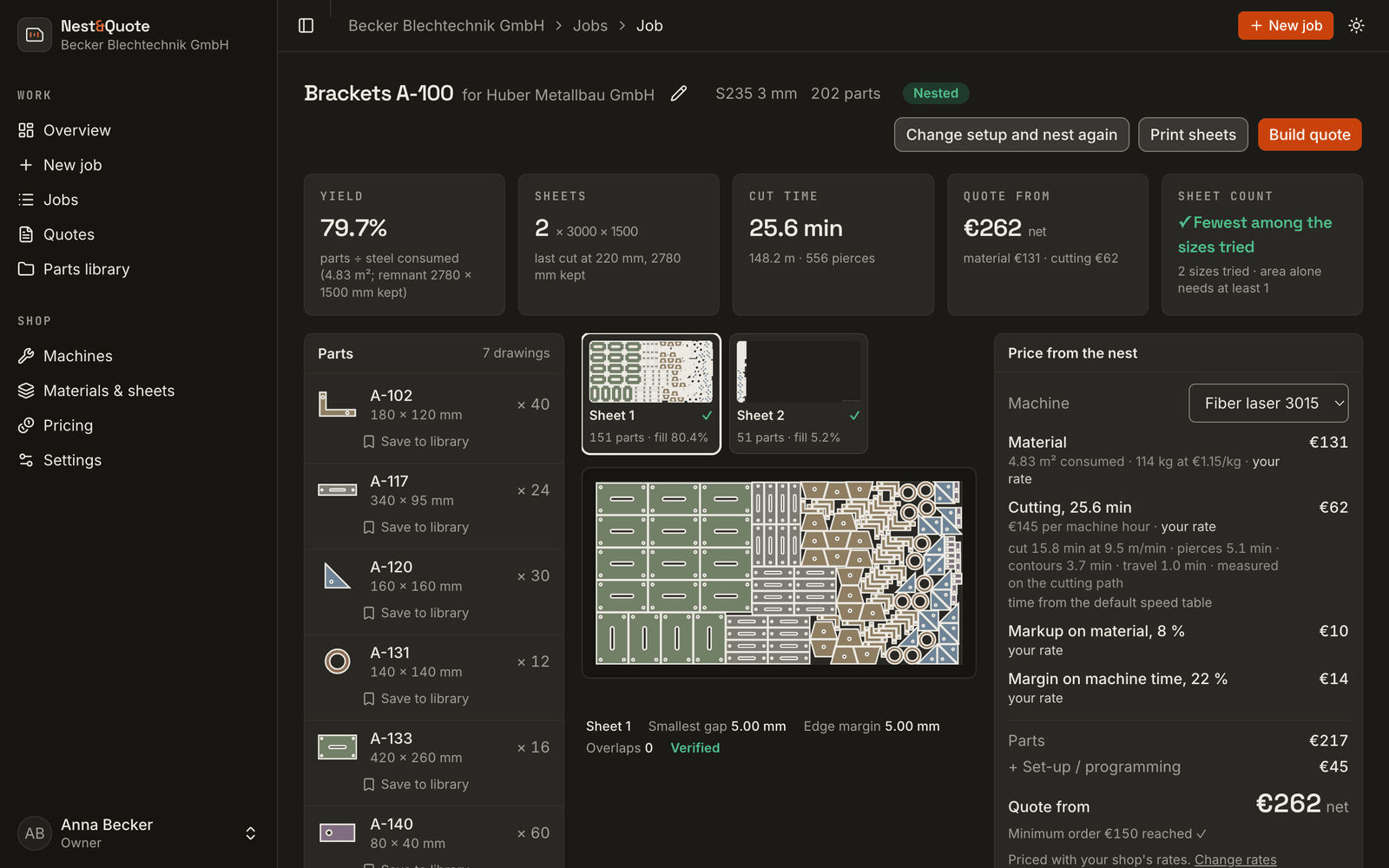
Nest first
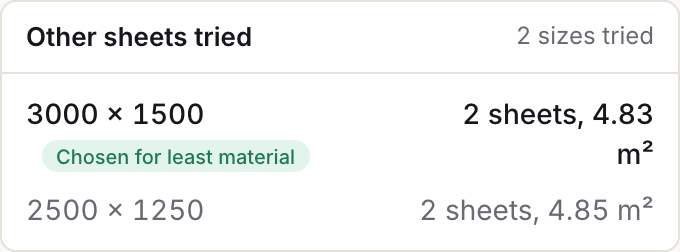
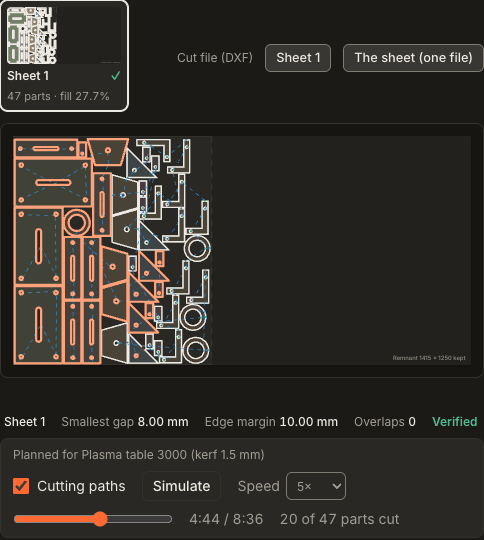
List the sheet sizes you stock and the job is nested on every one of them. Nest&Quote keeps the size that uses the least steel and lists the others with their sheet count and m², so you can see why it was chosen. Each sheet shows its sheet fill as a percentage, and the last sheet shows where the nest ends and the remnant that is left.
Checked, not assumed
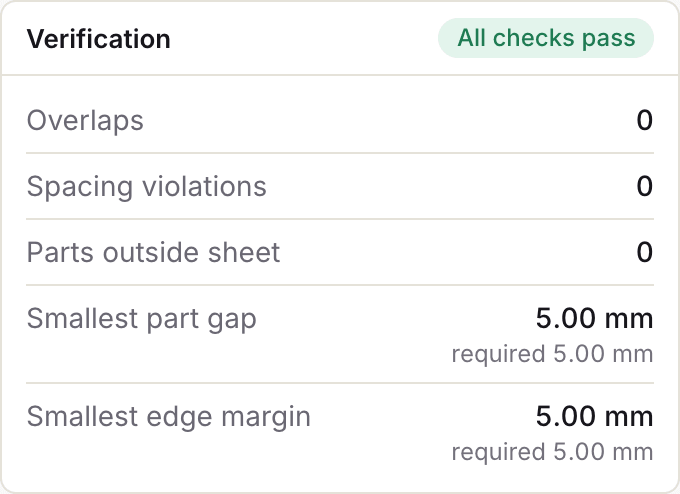
Every sheet is checked for overlaps, part gap, edge margin and parts outside the sheet. The smallest gap and the smallest margin on the sheet are printed next to the values you asked for. The nest is a drawing, not a picture: hover over a part to see its code, its size and how many are on that sheet.
Priced from the nest
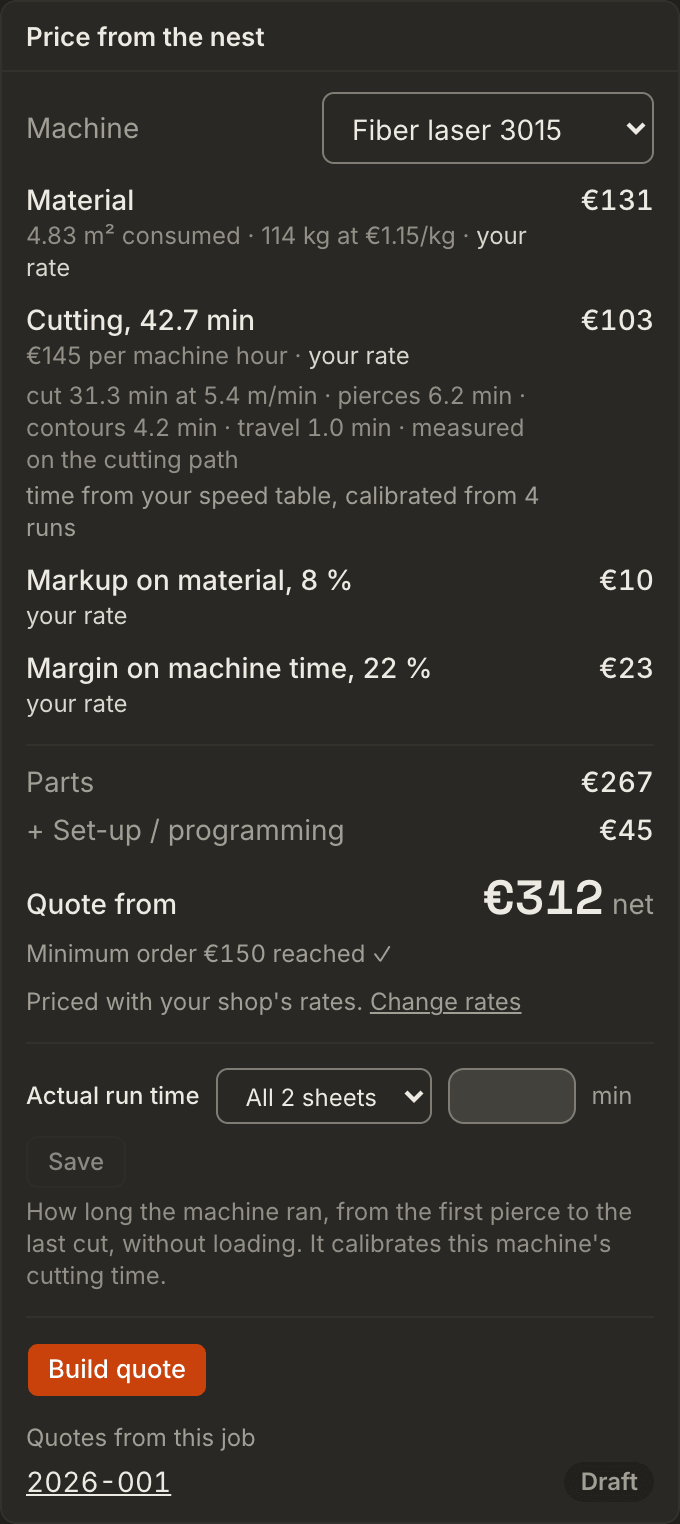
Material is priced from the steel the nest consumes, in m² and kg. Cut time comes from the cut length, the pierces, the contour starts and the travel, at your machine's own speeds once you have typed them, and calibrated from its real run times. Your hourly rates, material prices and markups go on top, each line marked your rate or default.
To the quote and the machine
The same nest becomes a quote: one line per part with its operations, set-up and minimum order, price breaks and VAT, printed as a PDF in German or English. For the machine it plans cutting paths with kerf, lead-ins and cut order, which you can play back on the sheet, and it writes a nested DXF per sheet or a G-code program, marked for a dry run. Once sent, the customer accepts the quote by a link without an account; the accepted order prints as a work order for the floor and goes back to the customer as an order confirmation.
03 · From drawing to quote and machine
From drawing to quote and machine in five steps
- Upload the drawings. In the browser, with nothing to install: DXF or TRUMPF GEO, one part per file, each with a part code and a quantity. Each file can have its own material and thickness. The import check leaves out frames and title blocks, counts bends and says which parts to look at.
- Nest on every stocked sheet, checked. The job is nested on every sheet size you stock, per material and thickness, and the size that uses the least steel is kept. Every sheet is checked for overlaps, part gap, edge margin and parts outside the sheet.
- Price from the nest on your own rates. Your machines with their hourly rates and speeds, your materials and prices, your markups. Cut time is worked out on the nest and can be calibrated from real run times.
- Build the quote. One line per part with its operations (bending, deburring, coating), set-up, minimum order and express, price breaks at the quantities you list, VAT for your country, EU business customers or export, and a PDF in German or English.
- Take it to the machine. Print the sheets for the floor, download a nested DXF for your CAM, or a G-code program written from the cutting paths, to run as a dry run first.
Each step, with screenshots: how it works.
04 · Common questions
Common questions
Which files can I use?
DXF or TRUMPF GEO, one drawing per part. Units are read from the file; a file with none is read as millimetres. DWG and STEP are not read today; export a DXF from your CAD, as you already do for the machine.
What happens if a drawing is not clean?
Anything that could not be nested is listed with the reason: a file that could not be read, a drawing with no closed contour, a part wider than every sheet you listed. Open contours are ignored and counted. If a file holds several outlines, the largest is nested, a note says so and you can choose another. From a drawing sheet, the frame and title block are left out. Preparing a DXF for cutting explains each note.
Does it replace my CAM or post-processor?
Not for every machine. Nest&Quote nests the job, prices it and plans the cutting paths. It writes machine programs in a few documented formats: generic G-code, EIA RS-274D, GRBL laser, the QtPlasmaC syntax, touch-off with Z for plasma, and router programs. None of them has been confirmed on a shop's controller yet, so every program is marked for a dry run. For other machines, the sheets go to the CAM you already use, such as LightBurn, SheetCAM or Fusion, as a nested DXF of each sheet, and to the floor as a print. Export formats
How is cut time worked out?
From the nest: the cut length and the pierce count, a cutting speed for the material and thickness, a time per pierce and per contour, and the travel along the cutting path. Speeds start from a default table for the process, labelled as defaults, until you type your machine's own. Calibration from real run times (TruTops packages, or times you type) brings the estimate towards what your machine really takes, and the price panel says which applies.
Do I need to know my hourly rate first?
No. Every rate starts as a default, typical for the process, and labelled as one; with an account you replace them with your own machines, rates and materials when you are ready. You do not need past quotes to get a price.
Which languages does it work in?
English and German. Numbers are written the way each language writes them: 3.5 mm in English, 3,5 mm in German.
Bring a job you quoted last week
Nest it here and compare the sheets, the steel and the price with what you sent.