Calculator
Laser cutting time calculator
Enter the cut length, the number of pierces and your machine's speeds. The calculator adds up the cutting, the pierces, the contour starts and the rapid travel, and shows each of them next to the total, so you can see where the minutes go.
It works for one part, one sheet or a whole job, as long as every input describes the same thing.
Defaults are typical for the process, not your machine. Cut length and pierce count come from your drawings when you nest a job.
What to enter
| Field | Unit | What to enter |
|---|---|---|
| Process | Laser, plasma, waterjet or CNC router. It sets the default values below. | |
| Material and thickness | mm | The feed and the pierce time depend on both. |
| Cut length | m | The length of every contour you cut: the outlines and the holes. |
| Pierces | count | Usually one per closed contour: one for the outline and one for each hole. |
| Feed | m/min | The cutting speed for this material and thickness, from your machine's cutting tables. |
| Pierce time | s | The time for one pierce at this thickness. |
| Allowance per contour | s | The time at each contour for the head to lift, move to the start and settle, and for the axes to speed up and slow down. |
| Rapid travel | m and m/min | The distance the head moves between contours without cutting, and the rapid speed. |
Feed, pierce time, allowance per contour and rapid speed start from default values for the process, material and thickness, each labelled default until you change it. The defaults are a starting point. For a quote, use the values from your machine's cutting tables.
How to calculate cut time
cut time = cut length ÷ feed
         + pierces × pierce time
         + pierces × allowance per contour
         + rapid travel ÷ rapid speed
- Cutting is the only term that grows with the metres you cut.
- Pierces and the allowance per contour grow with the number of contours, not with their length. A 10 mm hole costs the same pierce and the same start as a 2 m outline.
- Rapid travel depends on where the parts sit on the sheet. Of the four terms, it is the one the nest changes: cut length and pierce count are the same whichever nest you cut.
Mind the units. Metres divided by metres per minute gives minutes. Pierce time and the allowance are in seconds, so divide them by 60 before you add them up.
Why cut length ÷ speed is not enough
Machine reports from real laser jobs show why. The sheets of one job differ by up to a factor of two in minutes per metre, and the sheet with the small parts left over is the slow one: short contours, many pierces, and the head speeding up and braking at every one. A single metres-per-minute figure fitted to the whole job then comes out high on the sheets of large parts and low on the small-part sheet.
- One speed gets the sheets wrong in both directions. In the reports we have seen, sheets of large parts come out up to a third too high and the small-part sheet up to a third too low. On a job of only small parts, about a third of the machine time is missing from the quote.
- Small-part work is where it hurts. If your metres-per-minute figure comes from large parts, it is off by up to 2× on small ones.
- Machine time outweighs nest differences. An hour and a half of machine time is €150–225 at €100–150 an hour. A tighter nest of the same job saves a few euros of steel. A 3 % error in cut time is worth as much as that whole saving. Better material utilisation still pays, but the cutting line decides whether the quote is right.
Worked example: two sheets, the same metres of cut
Both sheets are 3 mm steel with 54 m of cut. Sheet A holds a few large parts, sheet B many small ones. The values are for illustration, not taken from any machine's cutting tables.
| Sheet A, large parts | Sheet B, small parts | |
|---|---|---|
| Cut length | 54 m | 54 m |
| Pierces | 60 | 360 |
| Feed | 9 m/min | 9 m/min |
| Pierce time | 0.5 s | 0.5 s |
| Allowance per contour | 0.3 s | 0.3 s |
| Rapid travel | 24 m at 60 m/min | 60 m at 60 m/min |
| Cutting | 54 ÷ 9 = 6.0 min | 54 ÷ 9 = 6.0 min |
| Pierces | 60 × 0.5 s = 0.5 min | 360 × 0.5 s = 3.0 min |
| Allowance per contour | 60 × 0.3 s = 0.3 min | 360 × 0.3 s = 1.8 min |
| Rapid travel | 24 ÷ 60 = 0.4 min | 60 ÷ 60 = 1.0 min |
| Cut time | 7.2 min | 11.8 min |
| Minutes per metre | 0.133 | 0.219 |
- Length ÷ feed gives 6.0 minutes for both sheets. Sheet A takes 7.2. Sheet B takes 11.8, almost twice the 6.0.
- On sheet B, 4.8 of the 11.8 minutes go on pierces and contour starts, not on cutting.
- At an illustrative €120 an hour, cutting sheet B costs €23.60. Priced on length ÷ feed, it would go out at €12.00.
What the calculator leaves out
- Cut order, lead-ins and common-line cutting. Your CAM sets these, or Nest&Quote's cutting paths do (without common-line cutting), and they change the travel, the pierce count and the cut length.
- Speed that changes with contour size. Small holes and tight corners run slower than the feed in the table. The allowance per contour covers part of that, and it is the field to adjust if your small-part jobs run long.
- Loading, unloading and operator time. Preparing programs and checking first parts is not machine time. Repeated layouts save some of it: a job of eight sheets can need only five programs when one layout runs several times.
Take the cut length and pierces from your drawings
The cut length and the pierce count are the two inputs that are hard to judge by eye. Nest your DXF drawings in Nest&Quote and the result gives both for the job, measured on the parts.
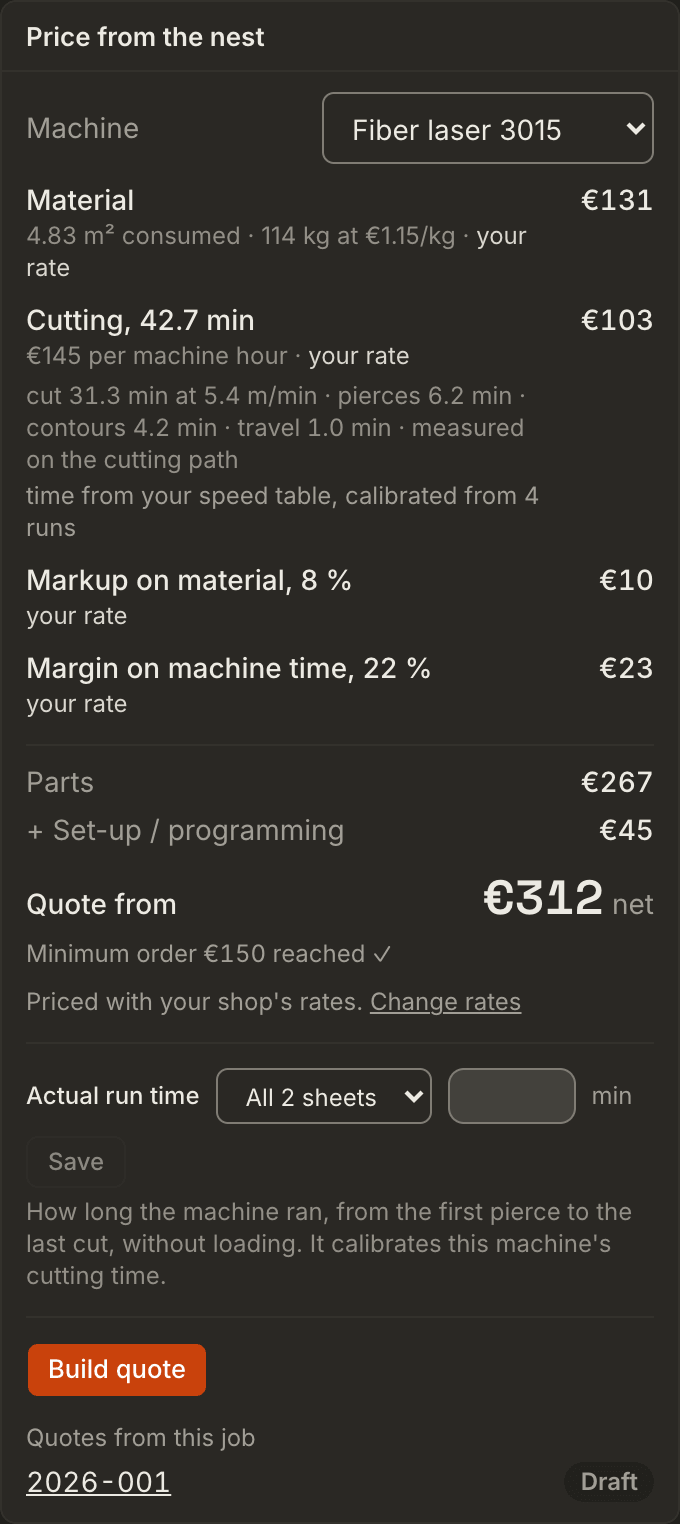
The "Price from the nest" panel next to it turns them into a cut time, split the same way as this calculator: cutting, pierces, contour starts and travel, with the travel measured along the nest's cutting path. Without an account it uses default values. With an account you set your own hourly rates and each machine's own cutting speeds and pierce times, and calibrate its cut time from real run times (TruTops packages or times you type). Without one, take the cut length and the pierce count into this calculator and work with your own values.
Questions
How do I calculate laser cutting time?
Divide the cut length by the feed. Add the number of pierces times the pierce time, and a small allowance for each contour. Add the rapid travel divided by the rapid speed. The calculator on this page does the sum and shows each term.
Why is my estimate too low on small parts?
Small parts have many contours for few metres. Every contour costs a pierce and a start, whatever its length, and on a short contour the head spends much of its time speeding up and braking instead of cutting at full feed. In the real job above, the small-part sheet took up to twice as long per metre as the others.
How do I count pierces?
Usually one per closed contour, so a part with six holes needs seven pierces. Nest&Quote counts them this way. If your CAM cuts shared edges once (common-line cutting) or cuts parts in a chain, the real count is lower.
Where do I find the real feed and pierce time for my machine?
In your machine's cutting tables (cut charts, technology tables) for the material, the thickness and the gas. For a check, the software on many machines writes a job report with the time and the cut length of each program. Divide the time by the length and you have your machine's minutes per metre on that sheet, pierces and all. Compare it with the minutes per metre the calculator shows for the same sheet. With an account, upload those reports (TruTops production packages) or type real run times on the Rates page, and Nest&Quote calibrates the feed, the pierce time and the allowance for your machine from them.
Does it work for plasma, waterjet or a CNC router?
Yes. The formula is the same for every process. Choose the process and the default values change; enter your own from your machine's tables.
How do I turn cut time into a price?
Divide the minutes by 60 and multiply by the machine's hourly rate. Then add the material, any other work and your margin. How Nest&Quote builds each line from the nest: quoting.
Check it against a job you have already cut
Nest the drawings of a job whose machine time you know. Compare the cut length, the pierces and the cut time with what your machine reported.