For your process
Laser nesting that checks every sheet and prices the job from the nest
Laser job shops cut thin to medium sheet: many parts per job, a lot of them small, and a quote that has to go out before the job is programmed. Nest&Quote is nesting and quoting software for that work. Drop in the DXF drawings and it nests them on every sheet size you stock, checks every sheet, and prices the job from that nest. It runs in the browser, in English and German.
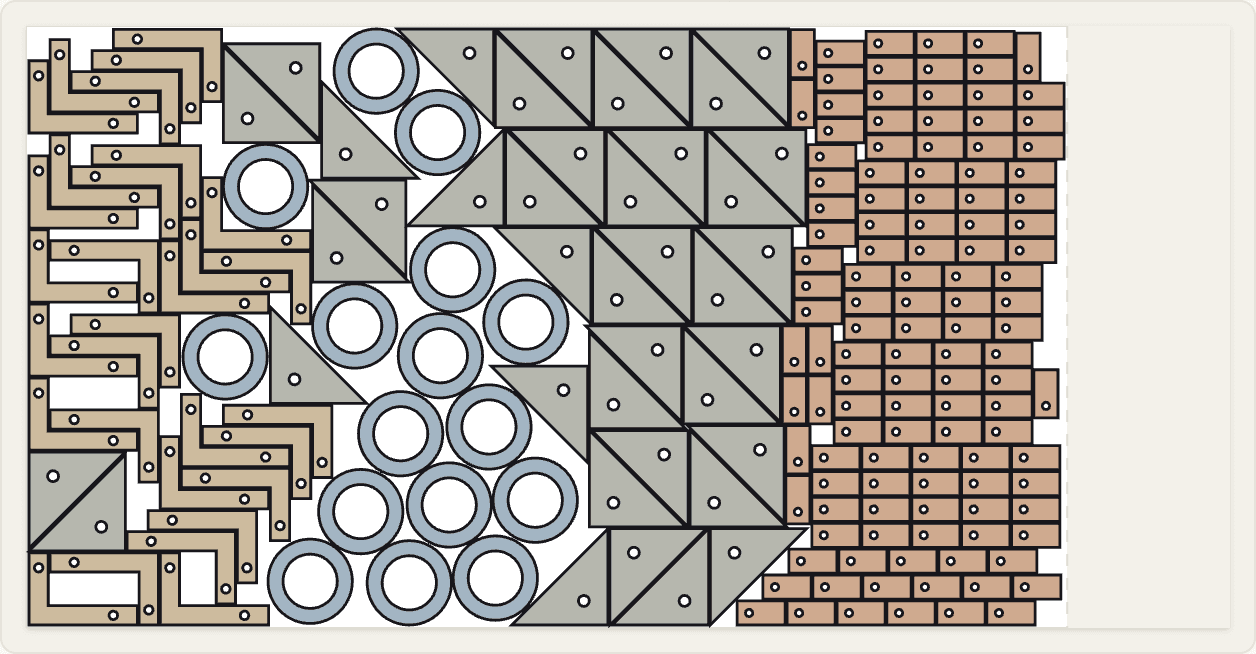
Sample in the demo: 206 parts in 1.5 mm stainless (1.4301), two sheet sizes tried, one sheet used.
Small parts take longer per metre
Cut length divided by feed is a fair estimate for large panels. It is not a fair estimate for a sheet of tabs, washers and brackets. Every contour starts with a pierce, and on short contours the head spends much of its time accelerating and braking instead of cutting at full feed.
Machine reports from real jobs show how much this matters: the sheet that holds the small parts left at the end of a job can run at twice the minutes per metre of the others. On small-part work, a single metres-per-minute figure can be out by up to a factor of two.
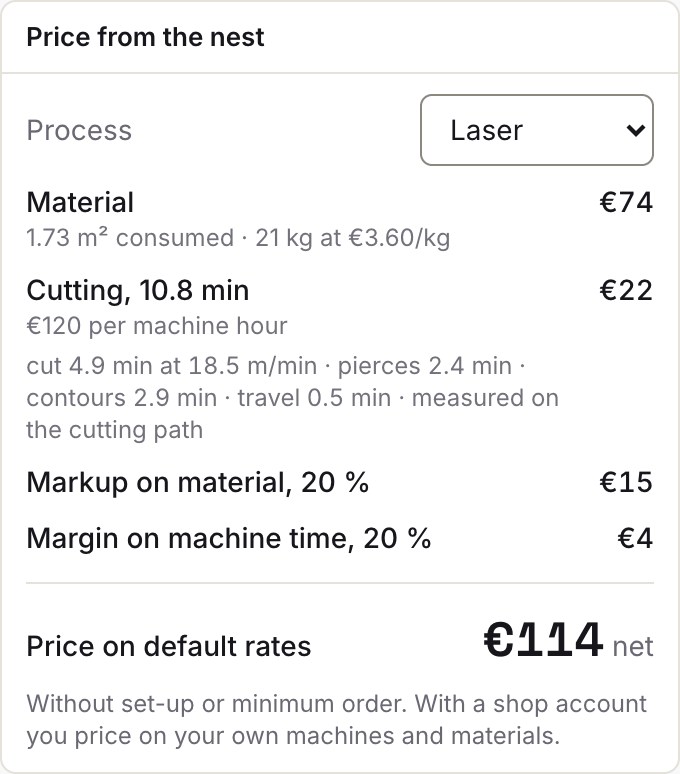
So Nest&Quote does not work out cut time from the metres alone. The ‘Price from the nest’ panel shows four parts:
- Cutting: the cut length at a feed for the material and thickness
- Pierces: the number of pierces, times a pierce time that grows with thickness
- Contours: a time for every contour, which is where a sheet of small parts adds up
- Travel: the moves between parts, measured along the nest's cutting path, or estimated from where the parts sit when a nest has none
On the stainless tabs sample in the demo, pierces and contours account for about half of the time on the cutting line. In the demo, feeds and times are defaults, labelled as defaults. With an account, each machine has its own speed table and can be calibrated from its real run times (TruTops production packages, or times you type), and the panel says which one the time came from.
Why cut length ÷ feed on its own falls short, worked through step by step: cut-time calculator.
Part gap: your value, checked on every sheet
With many small parts, the gap between them takes up a larger share of the sheet than it does with a few large ones. Nest&Quote suggests a part gap for the material and thickness, and starts the edge margin at a default. Neither knows your machine, so treat them as a starting point: if you run a tighter or a wider gap on your laser, set it on the job.
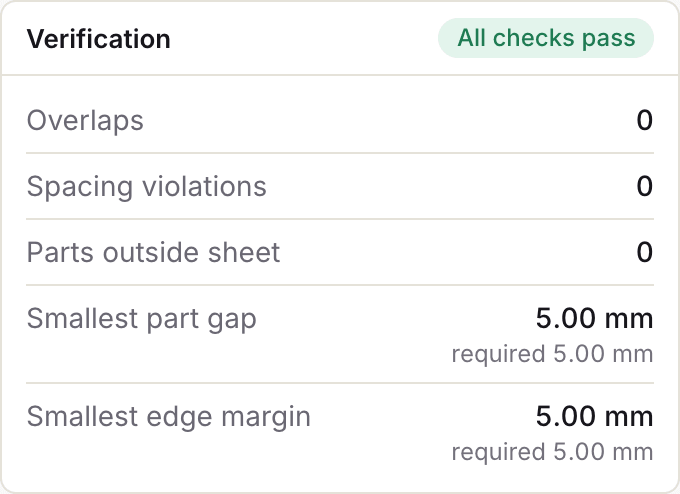
Every sheet is then checked against your values for overlaps, part gap, edge margin and parts outside the sheet. The smallest part gap and the smallest edge margin found on the sheet are printed next to the values you set, so a pass is a number you can read.
Parts that go to the press brake afterwards can be marked as bent. They are turned by 180° or not at all, so the grain stays the way you drew it.
What each check measures, and how the gap depends on process and thickness: part gap and edge margin.
If your laser software already nests
Many laser shops nest in the software that came with the machine. Keep writing the laser program there: Nest&Quote writes programs only for GRBL lasers and controllers that read generic G-code or EIA. What Nest&Quote covers is the work before and around the program:
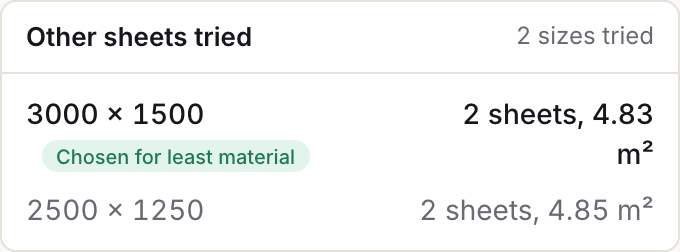
- Choosing the sheet. List the sizes you stock and the job is nested on each. The size that uses the least steel is kept, and the others are listed with their sheet count and m², so you can see why.
- A check you can read. Every sheet shows its smallest part gap and edge margin next to the values you set, and any overlap or part outside the sheet.
- A price from a real nest. Steel consumed, cut length and pierces come from the same nest as the sheets, so you can price the job on a real nest before it goes to the programming station.
- The browser. Nest&Quote runs in the browser, with nothing to install. Nesting a job for a quote does not tie up the workstation that programs the laser.
- More than one machine. The nested DXF is not tied to one machine maker's software: it imports into LightBurn, SheetCAM and Fusion. In the price panel you switch between your machines (or, without an account, between laser, plasma, waterjet and router), and the same nest is priced with that machine's rate and speeds.
Materials and sheet sizes
The material list holds the usual laser stock: S235 and S355 steel, 1.4301 and 1.4404 stainless, AlMg3 aluminium and copper, plus plywood, MDF and acrylic. Each material has a density and default laser feeds by thickness. The density turns the material consumed, in m², into kg for the price.
Enter the sheet sizes you keep in stock, in millimetres: for example 2000 × 1000, 2500 × 1250 and 3000 × 1500, or 4000 × 2000 on a large-format machine. Every sheet shows its sheet fill, the share of the sheet covered by parts, and the last sheet shows where the cut ends and how much is kept as a remnant.
From the nest to the laser
Export a nested DXF for each sheet, or one DXF with all the sheets, or print the sheets for the floor. Open the DXF in the CAM you already use to set lead-ins and write the machine code. For a GRBL laser, Nest&Quote writes the program itself from its cutting paths, marked for a dry run; programs for industrial laser controllers stay with the machine's software. More on export formats.
The result also counts programs: how many distinct layouts the sheets need. A layout that repeats on four sheets is programmed once and checked once, and that operator time is not in the cut time.
Pricing laser work from the nest
The price is a set of lines. Each line shows the quantity from the nest and the rate applied to it:
- Material: the material consumed in m² and kg, at a price per kg
- Cutting: the cut time above, at a rate per machine hour
- Markups: one on material, one on machine time
On jobs with many small parts, the cutting line is where a quote usually goes wrong. That is why its time is broken down rather than given as one figure.
Without an account, the hourly rate, the price per kg and the markups are defaults, labelled as defaults. With an account you set your own, per machine and per material, and build a quote for your customer from these lines: one line per part with its operations, price breaks, and a PDF in German or English. More on quoting.
Common questions
Our laser came with nesting software. Why use this as well?
To choose the sheet size and to price the job from a real nest before it is programmed. Nest&Quote nests the job on every size you stock and keeps the one that uses the least steel, checks every sheet and prints the numbers, and prices the job from the same nest. Keep your machine's software for the program: Nest&Quote writes programs only for generic G-code, EIA and GRBL controllers.
Does it write the program for my laser?
Only for a GRBL laser, or a controller that reads generic G-code, and then marked for a dry run. For other lasers, each sheet comes out as a nested DXF that you open in the CAM you already use, such as LightBurn, SheetCAM or Fusion, to set lead-ins and write the machine code.
How does it handle many small parts?
In the cut time, every pierce and every contour gets its own time on top of the cut length, so a sheet of small parts is not priced like a sheet of long straight cuts. Feeds and pierce times start as defaults, labelled as such, until you type your machine's own; calibrated from real run times, the estimate comes closer to what your machine takes.
Which part gap should I use on thin sheet?
The one your machine and material need. Nest&Quote suggests a part gap for the material and thickness, and a default edge margin; set your own on the job and every sheet is checked against them. Part gap and edge margin explains what each check measures.
Can I use my own rates?
Yes, with an account: your machines with their hourly rates, your materials and prices, your markups and operations, all on the Rates page. Every rate you have not set is a default and labelled as one. You do not need past quotes to get a price.
Bring a laser job you quoted last week
Nest it here and compare the sheets, the cut time and the price with what you quoted. Or look at the laser sample first.