For your process
Plasma nesting with the gaps checked and the pierces counted
For shops that cut mild steel, stainless and aluminium on a plasma table. Drop in the DXF drawings, nest the job on every sheet size you stock, check the part gap on every sheet, and price the job from the nest, pierces included.
See the plasma sample Nest a plasma job
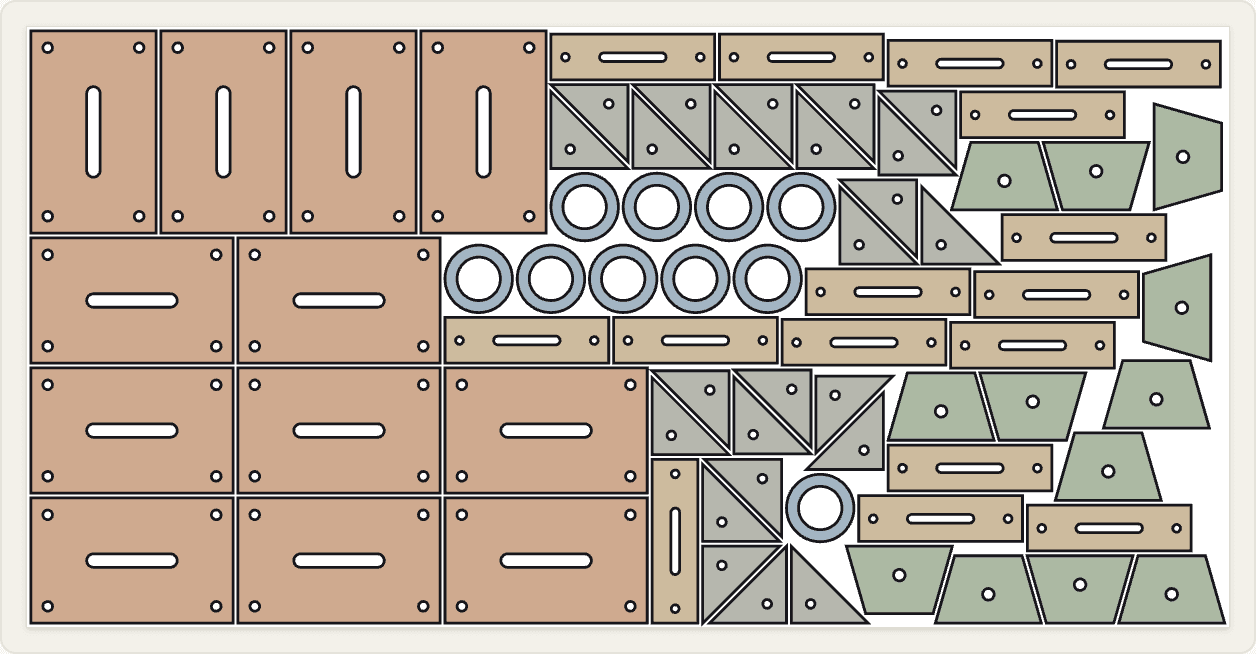
Sample: 80 parts in 6 mm S235, 10 mm part gap and edge margin, two sheet sizes tried.
What changes on a plasma table
Wider part gaps, set per job
A plasma kerf is wider than a laser's and the heat spreads further into the plate, so parts need more room between them and more distance from the edge of the sheet. Nest&Quote suggests a part gap for the material and thickness, and the suggestion grows as the plate gets thicker; the edge margin starts from a default. The suggestion does not depend on the process, so a laser job in the same material gets the same one. Both stay suggestions: set what your torch and your table need, job by job.
The gap is measured between the outlines as drawn. Kerf compensation stays in your CAM, so the gap you set has to cover the kerf plus the web of steel you want to leave between parts.
Every sheet is then checked against the values you set: overlaps, part gap, edge margin and parts outside the sheet. The smallest gap and the smallest margin measured on the sheet are printed next to the values you asked for. On the sample, both read 10.00 mm against 10.00 mm required.
Pierces add up
On plasma, every pierce means the torch stops, pierces the plate and starts again, and every pierce wears the consumables. A part with six bolt holes needs seven pierces, one for the outline and one for each hole.
Nest&Quote counts the pierces for the whole job this way. The sample's 80 parts need 240 pierces over 79.3 m of cut. Many plasma shops price by the inch or the metre of cut plus a charge per pierce; the result gives you both numbers for every job.
Cut time is worked out from the same nest: the cut length at a cutting speed for the thickness, a time for each pierce that grows with the thickness, a short time for each contour, and the travel between parts. The cost panel shows each part of the time. On the sample, on default values: 22.6 min of cutting at 3.5 m/min, 4.4 min of pierces, 3.2 min for contour starts and 0.5 min of travel. That is 7.6 of 30.8 minutes spent on pierces and contour starts rather than on cutting.
In the sample, the speeds and pierce times are defaults, typical for plasma, and labelled as defaults. With an account, each machine has its own speed table and can be calibrated from its real run times, and the travel is measured along the nest's cutting path.
Thicker mild steel, priced by weight
Material is priced from the steel the nest consumes, in m² and in kg. On thicker plate the weight adds up quickly: the 3.33 m² of 6 mm S235 in the sample weighs 157 kg. Default plasma cutting speeds are there for mild steel, stainless and aluminium, by thickness. For a material without a default speed, the cost panel says so instead of guessing.
Sheet sizes: 4 × 8, 5 × 10 and 1500 × 3000
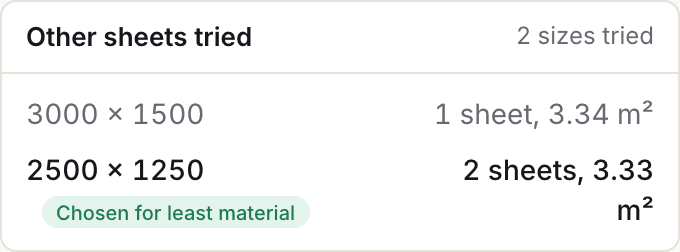
List the sheet sizes you stock and the job is nested on every one of them. Nest&Quote keeps the size that uses the least steel and lists the others with their sheet count and the steel consumed, so you can see why it was chosen.
Sizes are entered in millimetres. A 4 × 8 ft sheet is 1219 × 2438 mm and 5 × 10 ft is 1524 × 3048 mm; metric stock is usually 1250 × 2500, 1500 × 3000 or 2000 × 4000 mm.
The sample was nested on two sizes:
| Sheet size | Sheets | Steel consumed |
|---|---|---|
| 1250 × 2500 mm | 2 | 3.33 m², chosen |
| 1500 × 3000 mm | 1 | 3.34 m² |
The difference is 0.02 m², and the list shows it. If you would rather cut one larger sheet, take 1250 × 2500 off the list and nest again. Of the steel consumed, 76.5% became parts; the result shows this material utilisation for every job.
The remnant goes back on the rack
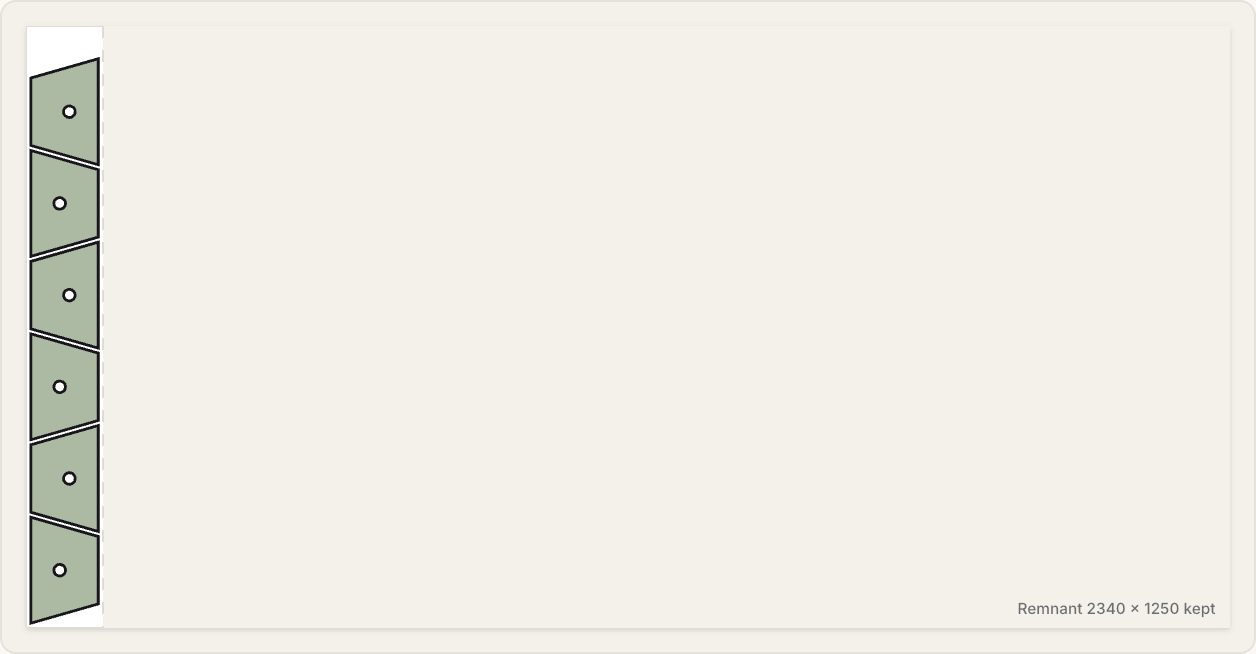
On the last sheet, the nest shows where the cutting ends and draws the strip that is left, with its size. On the sample, that is a remnant of 618 × 1500 mm. Steel consumed is counted only up to the end of the nest, so the material line charges the job for the steel it uses, not for the whole last sheet.
Nest&Quote does not keep a stock list of your remnants. The size is on the sheet so you can mark the offcut and put it back.
From the nest into SheetCAM
The sheets leave Nest&Quote as a print: Print sheets puts every sheet of the job on its own page, with the nest drawn over the whole sheet and the remnant marked, for the floor and the job folder.
Each sheet also downloads as a nested DXF, in millimetres, to open in the CAM you already use, such as SheetCAM, Fusion or the software that came with your table. There you set lead-ins, cut order, kerf compensation and the post for your controller, as you do for any drawing. Each part sits on its own layer, named after its part code, apart from the sheet outline and the labels, and round holes are written as true circles rather than as many short lines. In SheetCAM, you then put your cutting operation on the part layers and leave the other layers out.
One DXF with all the sheets of the job downloads as well.
For a controller that reads generic G-code (M3/M5), EIA RS-274D (M07/M08) or the QtPlasmaC syntax, or one where the program drives Z with a touch-off (G31) at every pierce, Nest&Quote also writes the program itself, from its own cutting paths: kerf compensation, pierces and lead-ins in the scrap, holes first. Small holes can get a reduced feed and an overburn with the arc off. Pierce height, cut height and THC codes are set per machine and labelled as defaults until you do, and every program is marked for a dry run until a shop has confirmed that controller. More on export formats.
Pricing a plasma job from the nest
The cost panel prices the job from the same nest, line by line:
- Material: the steel consumed, in m² and kg, at a price per kg
- Cutting: the machine time, split into cutting, pierces, contour starts and travel, at an hourly rate
- Markups: one on material, one on machine time
Without an account, set the process in the panel to Plasma and it runs on default rates, typical for plasma, labelled as defaults. With an account the job is priced on your plasma table, with its hourly rate and speeds, and Build quote turns these lines into a quote for your customer.
How each line is calculated: quoting.
Common questions
Does it replace SheetCAM or my post-processor?
Not for most tables yet. Nest&Quote nests the job, checks every sheet and prices it, and it writes programs for generic G-code, EIA and QtPlasmaC-syntax controllers and for touch-off with Z in the program, marked for a dry run. For anything else, SheetCAM or the CAM you already use still writes the code for your machine, from the print and the nested DXF of each sheet.
What part gap should I use for plasma?
It depends on the torch, the amperage, the thickness and how the parts come off the table. Nest&Quote suggests a gap for the material and thickness, and you change it if your machine needs more. The sample uses 10 mm on 6 mm mild steel. How gap and margin drive the nest: part gap and edge margin.
Can I work with 4 × 8 sheets and inch drawings?
Yes. Enter 4 × 8 ft as 1219 × 2438 mm and 5 × 10 ft as 1524 × 3048 mm. A DXF saved with inch units is converted to millimetres, and a file with no units set is read as millimetres. Set the units in your CAD's DXF export, and do not save inch drawings as R12, which cannot store units.
Can I charge per pierce?
Not as a line of its own today. The result shows the job's pierce count and cut length, and the cost panel turns the pierces into machine time at the hourly rate. Consumables are not priced separately.
Does it keep track of my remnants?
No. It shows and dimensions the remnant on the last sheet of every job, and it does not charge the job for it. It does not keep a list of the offcuts in your rack.
Bring a plasma job you quoted last week
Nest it here and compare the sheets, the steel and the pierce count with what you sent.