Compared honestly
Nest&Quote as a Deepnest alternative, compared row by row
Compared on 30 September 2026 from the public pages of Deepnest, deepnest-next and Nest&Quote.
Deepnest is open source nesting software. It runs on Windows, Mac and Linux, nests parts by their true shape and needs no account. If it does what your shop needs, keep using it.
This page is for shops that want three more things from a nest: the sheet size that uses the least steel, a check of every sheet, and a price. Each row below names its source and the date it was checked.
What Deepnest does well
- Open source. deepnest.io calls it "open source nesting software", and the code is public on GitHub.
- Runs on your own computer. A desktop app for Windows, Mac and Linux. The nest is computed on your machine.
- No account. Download it, import a file, mark the largest part as the sheet and start. It keeps searching until you stop it.
- More than the basics. True-shape nesting with a genetic algorithm, part-in-part placement, common-line merging, bitmap nesting for engraving, and CDR import.
- Well known. The original repository on GitHub has 1,165 stars and 324 forks (checked on 2026-09-30).
- Kept going by its community. deepnest-next, a community fork, publishes signed builds for macOS and Windows, has a website in German and English, and runs a Discord server. Its latest release, 1.5.6, came out on 19 May 2025.
Sources: deepnest.io, Jack000/Deepnest, deepnest.net, deepnest-next, checked on 2026-09-30.
Who each one is for
- Deepnest describes itself as "great for laser cutters, plasma cutters, and other CNC machines". deepnest-next says it is "for plotters, laser & plasma cutters, and other CNC machines".
- Nest&Quote is for shops that cut flat stock on a laser, plasma, waterjet or CNC router and write their own quotes: the owner or the estimator who has to say how many sheets a job needs and what it will cost.
Side by side
"Deepnest" means the original project at deepnest.io. Where a row is about the community fork deepnest-next, it says so. The Nest&Quote column describes what the product does today.
| Deepnest | Nest&Quote | Source | |
|---|---|---|---|
| Running it | A desktop app for Windows, Mac and Linux, downloaded as a zip; deepnest.io offers version 1.0.5. deepnest-next offers version 1.5.6, with signed builds for macOS and Windows. | In the browser, with nothing to install. | deepnest.io, deepnest-next releases, deepnest.net, checked on 2026-09-30 |
| Where the nest is computed | On your own computer. | On Nest&Quote's servers, from the drawings you upload. | deepnest.io, checked on 2026-09-30 |
| Nesting | True shape, with a genetic algorithm. Part-in-part placement. Common-line merging. | True shape. Small parts can sit in the cut-outs of larger ones. No common-line cutting yet. | deepnest.io, checked on 2026-09-30 |
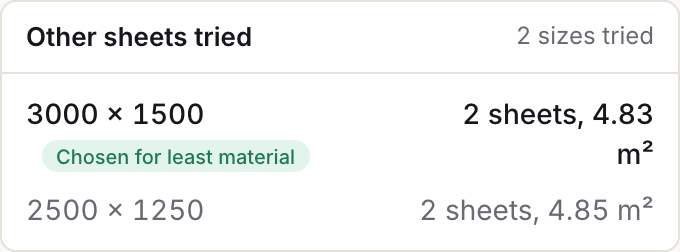
| Sheet sizes | The sheet is set from a part you mark as the sheet (quickstart: "Mark the largest part as your sheet, then hit start"). | Several sizes per job: you list the sheet sizes you stock. The job is nested on each, the size that uses the least steel is kept, and the others are listed with their sheet count and m². | deepnest.io, checked on 2026-09-30 |
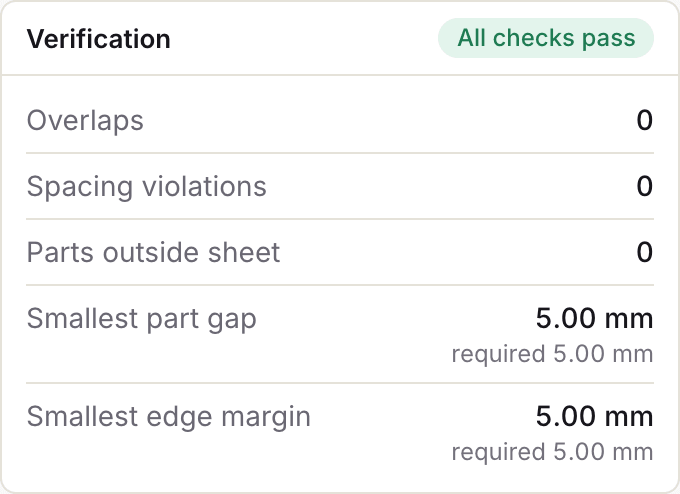
| Checks on each sheet | No check of the finished sheets is described. | Every sheet is checked for overlaps, part gap, edge margin and parts outside the sheet. The measured values are printed next to the values you set. | deepnest.io, Deepnest README, checked on 2026-09-30 |
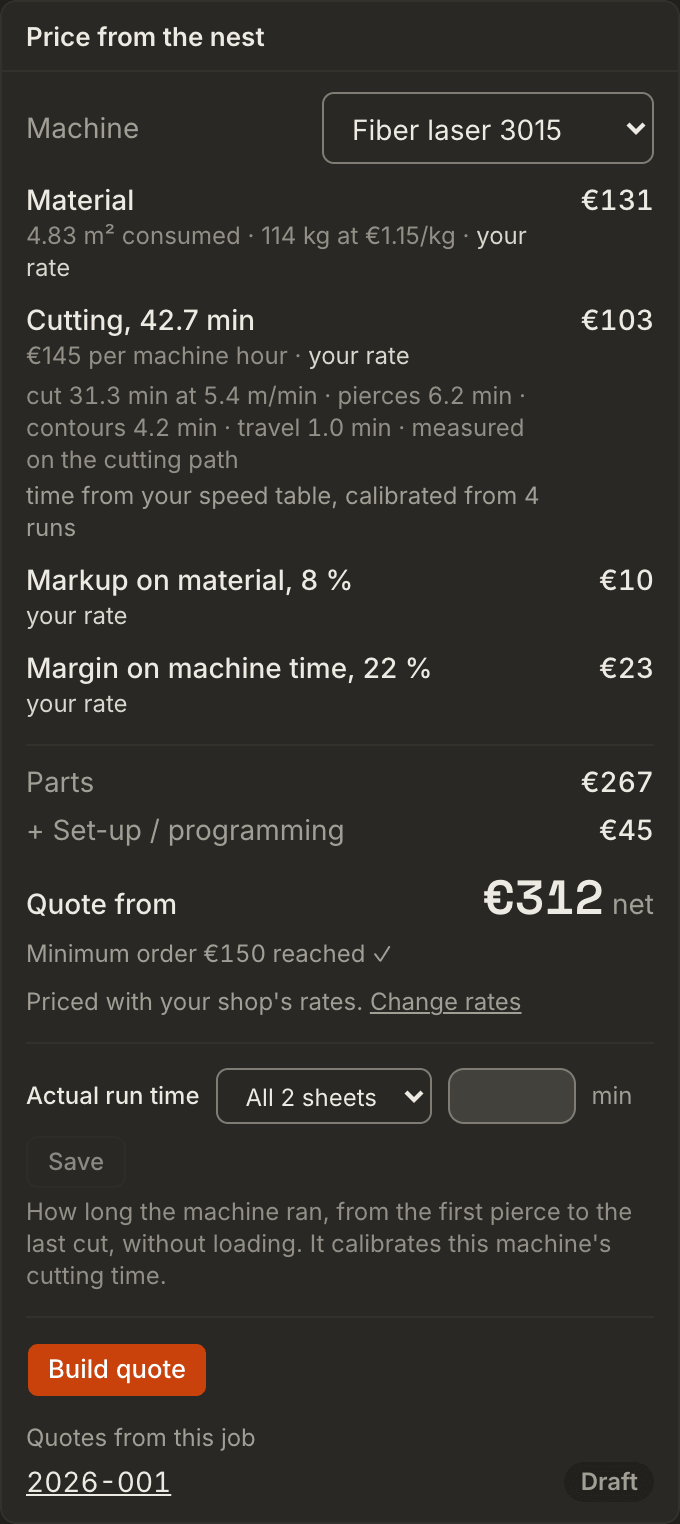
| Cost of the job | No costing or quoting. | The nest is priced from its steel, cut time and markups, on default rates without an account. With an account: your own machines, rates and materials, and a quote for your customer with one line per part, as a PDF. | deepnest.io, Deepnest README, checked on 2026-09-30 |
| Engraving | Bitmap nesting for engraving. | Not offered. | deepnest.io, checked on 2026-09-30 |
| Development | deepnest-next: release 1.5.6 on 19 May 2025; its roadmap lists a Rust rewrite, presets, native DXF and cloud-based nesting. | Updated continuously; each product page (export, quoting) marks what is available and what is planned. | Jack000/Deepnest, deepnest-next, checked on 2026-09-30 |
Where Nest&Quote is different
It runs in the browser
There is nothing to download or install. Nest&Quote runs in the browser on Windows, Mac or Linux, in English and German. You upload the DXF drawings for a job, they are nested on Nest&Quote's servers, and the result opens in your browser. How long uploads are kept is stated on the nester page.
It nests on every sheet size you stock
List the sheet sizes on your rack, for example 3000 × 1500 and 2500 × 1250 mm. Nest&Quote nests the whole job on each of them and keeps the size that uses the least steel: every full sheet, plus the used length of the last one. The rest of the last sheet is shown as a remnant, with its size. The sizes it did not choose stay on the list with their sheet count and steel consumed in m², so you can see why one was chosen. Each sheet shows its sheet fill as a percentage; the job's yield is measured on the steel consumed.
It checks every sheet and prints the numbers
The check runs after the nesting, on the real part outlines: overlaps, part gap, edge margin and parts outside the sheet. The smallest part gap and the smallest edge margin measured on each sheet are printed next to the values you asked for, to a hundredth of a millimetre, with a written Verified or Check failed. A failed check is shown with the numbers that failed, not hidden.
What to set for your process and thickness: part gap and edge margin.
It prices the job from the nest
Nest&Quote prices the nest line by line: material from the steel consumed, in m² and kg; cut time from the cut length, the pierces, the contour starts and the travel; then the markups. Without an account the rates are defaults, labelled as defaults: they show how the price is built, not what your shop charges.
With an account, the job is priced on your own machines, rates and materials, and Build quote turns these lines into a quote for your customer, with operations, price breaks and a PDF. More on quoting.
What Nest&Quote does not do
- No offline use. It needs an internet connection, and your drawings are uploaded to be nested.
- DXF and TRUMPF GEO only. One part per file. SVG, DWG, STEP and CDR files are not read.
- No common-line cutting yet. Every part keeps the full part gap to its neighbours.
- No bitmap nesting for engraving.
- Machine programs in a few formats only. G-code for generic (M3/M5), EIA RS-274D (M07/M08) and GRBL controllers, the QtPlasmaC syntax, touch-off with Z for plasma, and router programs, each marked for a dry run, because none is confirmed on a shop's controller yet. For other controllers, your CAM or post-processor still writes the program.
- Print and DXF. Print sheets puts every sheet on its own page, and each sheet, or the whole job, downloads as a nested DXF.
- Not open source. The code is not public.
Trying it on a job you nest in Deepnest now
- Take a job you have already nested in Deepnest, and note how many sheets it used.
- Export each part from your CAD as a DXF: one part per file, in millimetres, with closed outlines. The file name becomes the part code, and you can change it. Preparing a DXF for cutting covers the details.
- Enter the material, the thickness, the quantities and the sheet sizes you stock. Part gap and edge margin start from a suggestion; set them to what your machine needs.
- Nest the job, then compare the sheet count and the steel consumed with your Deepnest result.
Questions
Is Deepnest still maintained?
deepnest.io offers version 1.0.5. The community fork deepnest-next has released newer versions: its latest, 1.5.6, came out on 19 May 2025. Both were checked on 2026-09-30. For the current state, see the deepnest-next releases.
Can I keep using Deepnest?
Yes. Nothing stops you nesting the same job in both and comparing the sheets.
Does Nest&Quote run on a Mac?
Yes, in the browser. Deepnest runs on a Mac too, as a desktop app.
Does it write G-code or NC programs?
For a few documented formats: generic G-code (M3/M5), EIA RS-274D (M07/M08), GRBL in laser mode, the QtPlasmaC syntax, touch-off with Z for plasma, and router programs, written from Nest&Quote's own cutting paths. Every program is marked for a dry run until a shop has confirmed that format on its controller. For other controllers, your CAM or post-processor writes the machine program from the nested DXF.
Why does this page have a date?
Both products change. The rows about Deepnest come from its public pages on the date shown. If a row is out of date, tell us and we will check it and correct the page.
Bring a job you nested in Deepnest
Nest it here and compare the sheets and the steel with what you cut.
Deepnest and deepnest-next are independent open source projects. NestAndQuote is not affiliated with either project and is not endorsed by them. Their names are used only to identify their software.