Guide
Part gap and edge margin: what to set and what the check tells you
The part gap is the clear distance between two neighbouring parts on the sheet. The edge margin is the clear distance between any part and the edge of the sheet. Both depend on the process and the thickness, both cost steel, and both are measured again on every sheet Nest&Quote nests. This guide covers where to start, how the two values drive yield, and what each number in the verification panel means.
Two distances, measured on the drawing
- Part gap, often called part spacing, is the shortest distance between the outlines of two parts. It applies inside cut-outs too: a small part nested in the hole of a larger one keeps the same gap to the edge of that hole.
- Edge margin is the shortest distance from any part to any of the four sheet edges. Nest&Quote uses one value for all four sides.
Both are measured between the outlines as drawn. Kerf compensation comes later, in the cutting paths, Nest&Quote's or your CAM's: each outer cut then runs just outside its part and removes a strip one kerf wide. Between two parts, the web of material left standing is the gap minus two kerf widths. With a 10 mm gap and a kerf of, say, 2 mm, the web is 6 mm.
At a gap of one kerf width, two neighbours would share a single cut. That is common-line cutting, and Nest&Quote does not use it: every part keeps the full gap to its neighbours.
Why the gap depends on the process
Laser
The kerf is narrow, so the gap is set less by the cut itself than by what happens around it. On thin sheet, a narrow web can warp with the heat, and a small part that tips up can catch the cutting head. On thicker plate, cuts that run close together heat the web between them, and the second cut comes out worse than the first.
Plasma
The kerf is wider and the heat goes further into the plate. Every outer contour starts with a pierce and a lead-in, both in the gap, and a plasma pierce throws molten metal. The gap has to hold the lead-in and keep the pierce clear of the next part, so plasma gaps are wider than laser gaps at the same thickness.
Waterjet
There is no heat, so there is no heat-affected zone to allow for. The gap is set by the kerf, the lead-in, and the way the jet trails and widens on its way through thick plate. Parts that come loose can tip in the tank and catch the nozzle, so the skeleton has to stay rigid.
CNC router
The kerf is the full diameter of the bit. At a gap of exactly one bit diameter, the cuts for two neighbours run in the same slot; any less and the bit cuts into the next part. Shops usually add a clearance on top, for chips and for small parts that shift as the vacuum loses its grip.
Why thickness changes it
Thicker material takes longer to pierce and, on laser and plasma, means a wider kerf and more heat. So the gap grows with the thickness. Thin sheet still has a floor: with a gap under about 2 mm, the web between parts can get too weak to hold its shape.
Starting points to check against your machine
These are ranges to start from, not rules, and they are not the values Nest&Quote suggests. Your machine's cut charts, your gas or abrasive, your nozzle or bit, and a test sheet decide the value.
| Process and thickness | Part gap to start from | Edge margin to start from |
|---|---|---|
| Laser, sheet up to 3 mm | 2 to 5 mm | 5 to 10 mm |
| Laser, thicker sheet and plate | about the sheet thickness | 5 to 10 mm |
| Plasma, sheet up to 3 mm | 5 to 8 mm | 10 to 20 mm |
| Plasma, plate up to 15 mm | 8 to 10 mm | 10 to 20 mm |
| Plasma, plate over 15 mm | 15 mm and up | 10 to 20 mm |
| Waterjet | about 5 mm, more on thick plate | about 12 mm, more where clamps sit |
| CNC router | the bit diameter plus a clearance, up to twice the bit diameter | about 10 mm, more where screws or clamps hold the sheet |
If a value cuts clean parts on your machine, it is the right value, whatever this table says.
What the edge margin is for
The margin keeps parts away from the part of the sheet you cannot rely on: edges that are not straight or not square, a sheet that does not sit exactly on the machine's zero point, and the zone where clamps or weights hold it down. Nest&Quote applies one edge margin to all four sides, so set the value the worst side needs.
The margin also decides which sheet sizes a part fits on. A part that measures 1475 mm across its narrow side leaves room for a 10 mm margin on a 1500 mm wide sheet, but not for 15 mm. At 15 mm, if you also stock a wider sheet, Nest&Quote lists the 1500 mm size as not possible and names the part that is wider than the sheet. If a part is too wide for every size you stock, it is left out of the job and listed under Not nested.
How gap and margin drive yield
Every part carries half the gap all the way round its outline, so the gap costs steel on every part in the job. The demo's plasma sample holds 80 parts in 6 mm S235 on a 1500 × 3000 mm sheet with a 10 mm edge margin. Here it is nested again by the same engine at three part gaps:
| Part gap | Steel consumed | Yield | Remnant kept |
|---|---|---|---|
| 6 mm | 3.15 m² | 80.8% | 902 × 1500 mm |
| 10 mm, the demo's gap | 3.34 m² | 76.0% | 771 × 1500 mm |
| 15 mm | 3.42 m² | 74.3% | 719 × 1500 mm |
All three pass every check. Going from 10 mm down to 6 mm saves 0.20 m² of steel, about 9 kg of 6 mm plate. Going up to 15 mm costs 0.08 m², about 4 kg. Yield here is the share of the steel consumed that became parts; the result shows it at the top of every job. Whether 6 mm holds on your torch is a question for your machine, not for the nest.
The gap costs most on small parts, because a small part has a lot of outline for its area. A rectangular part takes up its own size plus one gap in each direction:
| Part | Space taken at a 3 mm gap | At a 6 mm gap | Increase |
|---|---|---|---|
| 40 × 80 mm | 43 × 83 mm | 46 × 86 mm | 10.8% |
| 420 × 260 mm | 423 × 263 mm | 426 × 266 mm | 1.9% |
The edge margin costs steel too, on every sheet. Around a full 1500 × 3000 mm sheet, a 5 mm margin covers 0.045 m², 1.0% of the sheet; 10 mm covers 2.0% and 20 mm covers 4.0%. On a last sheet that is only partly used, Nest&Quote counts the steel up to the last part plus one edge margin, and the rest is kept as a remnant.
Steel consumed is what the material line of the price is calculated from, so the gap you set shows up in the price. What that steel weighs: sheet-weight calculator.
So set the smallest gap your machine cuts clean parts at. A gap it cannot hold does not save steel: the part that warps or tips has to be cut again.
What the verification numbers mean
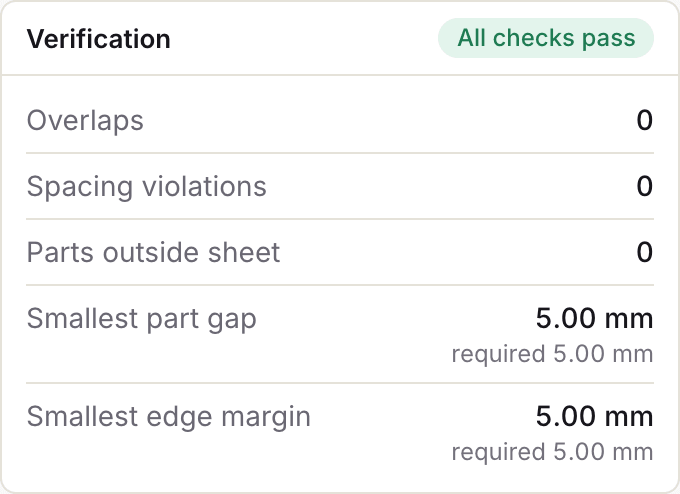
After the search has placed the parts, every sheet is measured again, on the real part outlines and separately from the nesting. Each sheet's tab gives its sheet fill; under the sheet you see the smallest gap, the edge margin, the number of overlaps and Verified or Check failed. The verification panel beside it lists five numbers for that sheet, and a badge says whether all sheets pass.
Overlaps
The number of pairs of parts whose outlines touch or cross. It should read 0. A sheet with an overlap cannot be cut as nested.
Spacing violations
The number of pairs of parts that sit closer to each other than the part gap you set. A pass is 0. If the smallest part gap reads less than required, this count is above 0, unless the parts touch: those are counted as overlaps, and the smallest part gap then reads 0.00 mm.
Parts outside sheet
The number of parts whose outline crosses the edge of the sheet. A pass is 0. A part that is on the sheet but too close to its edge is not counted here; it shows in the smallest edge margin.
Smallest part gap
The shortest distance measured between any two neighbouring parts on the sheet, to a hundredth of a millimetre, with the gap you set printed beside it as required. On a tight nest it usually equals the required value, because parts are packed until they sit exactly one gap from their neighbours. The plasma sample reads 10.00 mm, required 10.00 mm. A dash means no pair of parts was close enough to measure: no part sits within the required gap plus 2 mm of another, as on a sheet with a single part.
Smallest edge margin
The shortest distance from any part to any edge of the sheet, with your edge margin beside it as required. A pass is a value no smaller than the required one. This is the one check judged on a distance rather than a count. It allows 0.01 mm for rounding, so a margin that measures 4.999 mm against 5 mm required shows as 5.00 mm and passes.
When a check fails
A sheet is Verified when overlaps, spacing violations and parts outside the sheet are all 0 and the smallest edge margin is at least the required value. If any of these is not met, the sheet is marked Check failed and the badge reads Some checks failed.
Nest&Quote prefers a sheet size on which every part is placed and every check passes. If no size manages that, you still get a nest, with the numbers that failed: a sheet that fails a check is marked Check failed, and parts that did not fit show in the Placed count. Do not cut a sheet marked Check failed. The panel says which check failed and by how much; it does not point to the parts involved. Nest the job again, and if the sheet still fails, tell us.
Setting the gap and margin in Nest&Quote
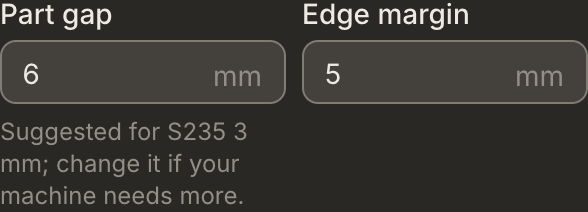
When you set up a job, the part gap is filled in with a suggestion for the material and thickness, with a note such as "Suggested for S235 6 mm; change it if your machine needs more." The edge margin starts from a default. The suggestion is based on material and thickness only: it does not know your machine or which process you cut with. Change either value on the job, and every sheet is checked against the values you set.
Common questions
What spacing should I leave between parts?
The smallest your machine cuts clean parts at. Start from the ranges above, cut a test sheet, and go wider if webs warp, parts tip, or pierces mark the next part.
Can I nest parts on a common line?
No. Nest&Quote does not place parts on a shared cut line: every part keeps the gap you set to its neighbours, and parts whose outlines touch count as overlaps.
Does the part gap include the kerf?
No. The gap is measured between the outlines as drawn. With kerf compensation, the web left between two parts is the gap minus two kerf widths.
Why is the smallest gap exactly the value I set?
Because the nest packs parts until they sit one gap from their neighbours. A smallest gap equal to the required value is what a tight nest looks like.
Does a wider gap change the cut time?
The cut length and the number of pierces stay the same whatever the gap. Only the travel between parts changes, and on the plasma sample travel is 0.5 of 30.8 minutes on default values. So the gap shows up in the price mainly through the material line, not through the machine time at the hourly rate.
Does the edge margin apply to all four sides?
Yes, one value for all four. If one side needs more, for example where clamps hold the sheet, set that value.
Check it on a real nest
Open the plasma sample and read its verification panel, or nest a job you quoted recently with the gap you run today.